


Internal linking for SEO means connecting related pages on your own website with useful, descriptive links. These links help readers continue their research and help search engines discover and understand your content. Start with important pages that are difficult to reach, then add relevant links from existing articles and navigation.
I would rather improve the connections between ten useful articles than publish ten more articles that readers cannot find. For a small business, internal linking is a practical part of website maintenance: you control the source page, destination and wording.
This guide shows how to choose those connections, add them in WordPress and check whether they help. Use it alongside my broader SEO best practices checklist.
What are internal links?
An internal link takes someone from one page to another within your website. A link from an introductory SEO article to your keyword research tutorial is an internal link. A link from your article to Google’s documentation is an external link. A link from another website to your article is a backlink.
Internal linking does not require another publisher’s permission or a paid SEO tool. It does require judgement: the destination should answer a question raised by the source page.
- Navigation links connect visitors to main sections through menus.
- Contextual links appear inside relevant sentences in an article or service page.
- Breadcrumbs show a page’s position within a hierarchy.
- Related-content links suggest a sensible next article.
- Footer links provide recurring access to contact, company and policy information.
These serve different purposes. A footer link to your privacy policy is useful even if your SEO tutorial deserves more contextual links.
Why internal linking matters for SEO
Google’s link best practices recommend crawlable links and concise, descriptive anchor text. Google also says that each important page should receive a link from another page on the site. That is a better starting point than chasing a fixed link count.
Think about a visitor reading your store setup guide. A link to shipping troubleshooting helps when shipping methods do not appear. A link to an unrelated celebrity story adds little, even if that story gets more traffic.
Links can communicate which pages belong together and support discovery. They cannot make an inaccurate article useful, remove an accidental noindex directive or guarantee a ranking. My guide to Google ranking factors explains why these issues need separate attention.
Build a useful internal linking strategy in seven steps
1. Choose the pages that matter to your readers and business
Make a short list of cornerstone guides, product categories and service pages. Include important new articles that do not yet have obvious entry points. For each page, write one sentence describing the problem it solves.
My starting worksheet would contain the page URL, intended reader, main question, useful source pages and next action. If you cannot explain why a reader should visit the destination, improve its purpose before sending more people there.
2. Group pages around a real task
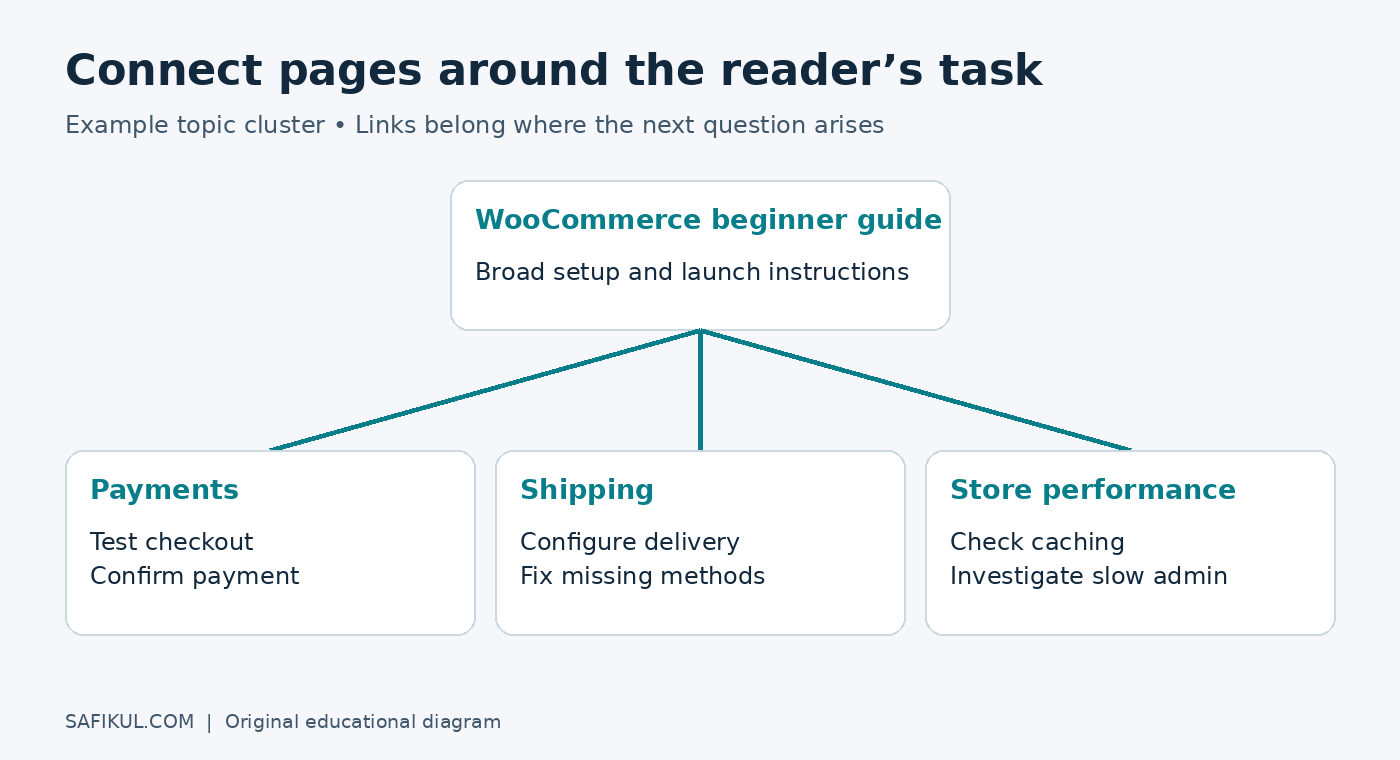
A topic cluster is a group of related pages, often organised around a broader guide. It is an editorial planning method, not a special Google requirement. Build clusters around tasks such as starting an online store, researching keywords or measuring advertising.
On this site, the WooCommerce beginner tutorial provides the broad starting point. A reader facing a checkout problem needs the more specific checkout troubleshooting guide. Those pages serve different intentions and can naturally connect.
Do not force every page in a cluster to link to every other page. Add the connection where the reader needs it.
3. Find existing pages that already discuss the subject
Search your CMS for related terms. A search such as site:example.com "shipping" can also reveal candidate pages, but search results are not a complete inventory. For a larger site, compare a crawl export with your CMS URL list.
Read each candidate paragraph before editing. A page with many backlinks may be attractive, but relevance still comes first. Avoid adding a paragraph solely to accommodate a link that otherwise does not belong.
4. Write anchor text that describes the destination
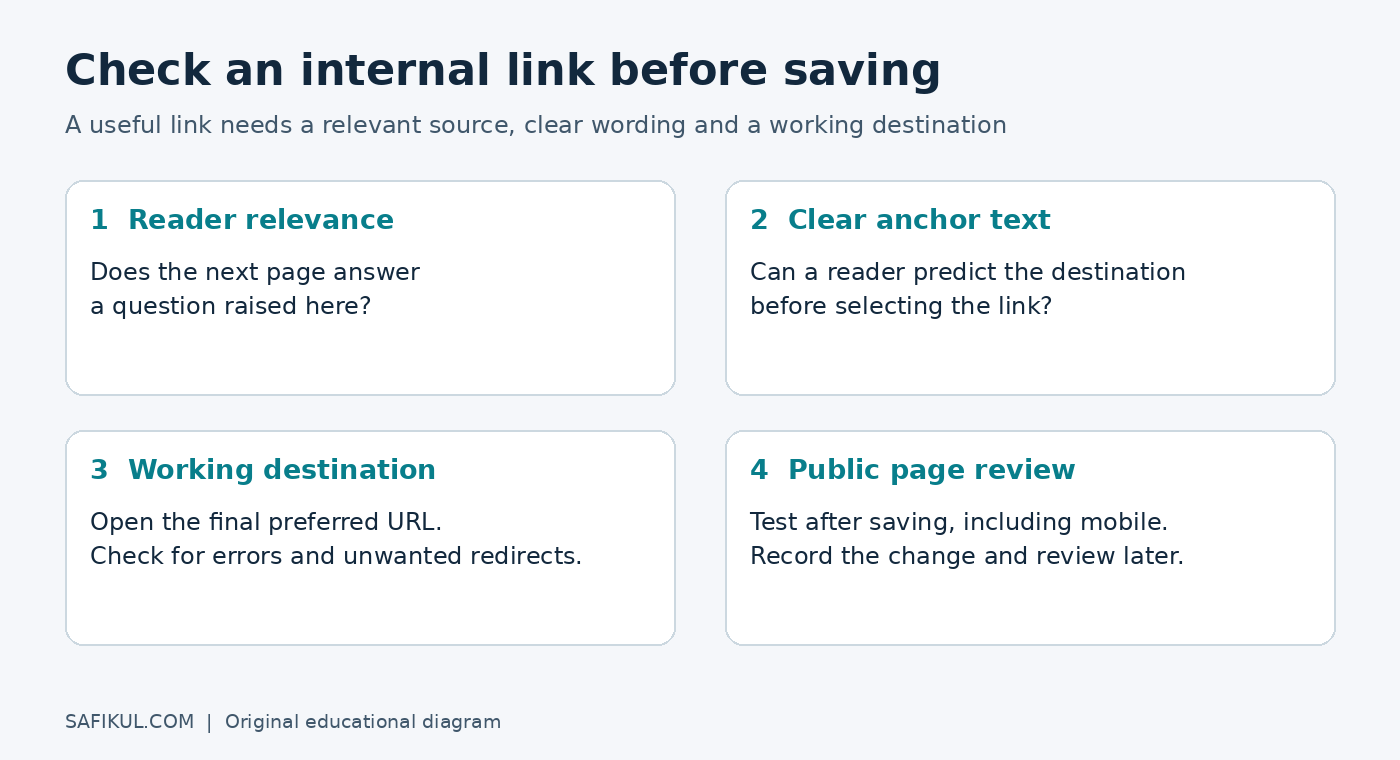
Anchor text is the clickable wording. Give readers enough information to decide whether to follow it. For example, “fix WooCommerce shipping methods that are missing” is more useful than “click here” when the destination is a shipping troubleshooting article.
- Too vague: “Read more here.”
- Useful: “Compare keyword trends before choosing your topic.”
- Overloaded: “Best keyword research free keyword tool SEO keyword research guide.”
A relevant keyword can fit naturally. You do not need an exact-match anchor every time, and you do not need to manufacture unusual variations. Read the complete sentence aloud. It should still sound like an explanation written for a person.
5. Link to the final working URL
Open the destination and check that it loads the intended content. Prefer the final preferred URL rather than an old address that redirects. If the page has moved, update the source link instead of relying indefinitely on a redirect chain.
Use ordinary HTML links with an href destination. A clickable visual element created only through a script may not provide the same crawlable link. Ask a developer to inspect unusual components if you are unsure.
6. Add links both to and from new articles
When publishing a new tutorial, link out to relevant existing resources. Then revisit a few older articles where the new tutorial would help. This second step is easy to forget.
For example, a new Search Console tutorial can link to a keyword research guide. An older SEO checklist can also introduce the new tutorial in its measurement section. That gives the new resource a meaningful entry point instead of leaving discovery entirely to the latest-posts feed.
7. Record the changes and review the outcome
Keep a simple log: date, source URL, destination URL, anchor text and reason for the change. Review the edited pages on mobile as well as desktop. Make sure links are visually distinguishable and comfortable to tap.
Measure the destination’s search performance over comparable periods. If traffic rises, do not automatically assign all the credit to the links; content changes, demand and competitors can also affect results. The useful question is whether readers now have a clearer route to valuable information.
How to add internal links in WordPress
- Open the relevant post in the block editor.
- Select the words that should become the link.
- Choose the link control or use Ctrl+K on Windows or Command+K on Mac.
- Search for the destination post or paste its full URL, then apply the link.
- Preview the sentence, save the update and test the link on the public page.
For ordinary internal navigation, I usually keep the link in the same tab. The reader can choose a new tab themselves. If an SEO plugin adds link suggestions, review each one; a matching word does not prove that the destination fits the paragraph.
WordPress.com’s internal linking lesson offers additional examples for WordPress publishers.
Audit these internal linking problems first
Orphan pages: These have no discoverable incoming internal links in the inventory you are checking. A normal crawl can miss them, so compare crawler results with your CMS and sitemap. Add a relevant entry point if the page deserves to remain public.
Broken destinations: Replace a broken link with an appropriate working page. If no equivalent exists, remove the link or revise the sentence. Sending every missing URL to the homepage usually frustrates readers.
Unclear anchors: Replace generic wording where a descriptive phrase would help. Do not rewrite every navigational “Contact” link into a long keyword phrase.
Accidental exclusions: If an important destination is blocked or marked noindex, investigate the reason. Internal links cannot override those controls. Some pages, such as account screens, should remain excluded.
Overloaded templates: A sitewide list of hundreds of unrelated destinations can make navigation harder. Organise useful categories instead of squeezing every URL into every footer.
How many internal links should a page have?
There is no universal ideal number. Google explicitly says there is no magical link count. A short answer may need one contextual resource; a comprehensive tutorial may need several. Menus, breadcrumbs and footers also contribute links, so a raw total needs interpretation.
My editorial test is simple: does each link answer a likely next question? If removing it makes the article less helpful, it probably has a purpose. If three adjacent links interrupt one simple sentence, simplify the passage.
Does internal linking help AI search visibility?
Clear connections make your content easier to navigate and understand, but there is no reliable rule that a certain number of internal links earns an AI citation. Google’s generative AI search guidance continues to emphasise useful content and sound technical foundations rather than special formatting tricks.
Keep definitions clear, explain your examples and cite sources for factual claims. Preserve the detail a reader needs rather than shortening every section for an imagined AI formula. For measurement beyond ordinary search clicks, see my guide to tracking AI search visibility.
Frequently asked questions
Can internal links replace backlinks?
No. They are different connections. Internal links organise your own site; backlinks originate elsewhere. Work on useful site navigation without assuming it replaces every other part of SEO.
Should internal links use nofollow?
Normal editorial links to your own useful pages generally do not need nofollow. Do not treat it as a substitute for deciding which pages should be indexed or secured.
Can I automate internal linking?
You can automate suggestions and broken-link checks. I would retain human review for relevance, wording and the final destination. Bulk keyword matching can create distracting links very quickly.
How soon will internal linking improve rankings?
There is no fixed timeline or guaranteed improvement. Search engines need to revisit pages, and other factors influence performance. Track the changes and give comparable data time to accumulate.
Your next step
Choose one important article today. Find two existing pages where it answers a real follow-up question, add the links and test them. Then repeat the process during your regular publishing routine. As the founder of Leelija, I favour improvements a business can maintain consistently; this is one of them.