

SEO best practices help search engines discover and understand your pages while helping people find useful answers. For a business website, I would start with accessible pages, clear search intent, original content, descriptive titles and relevant internal links. Then I would improve page experience and measure qualified enquiries alongside search traffic.
The challenge is deciding what to do first. A small team can spend weeks polishing an SEO score while an important page still answers the wrong question. This guide gives you a practical sequence, a publishing checklist and a 30-day plan you can adapt to your business.
These recommendations cover organic search and Google’s AI search features. They are grounded in official guidance checked on 24 October 2026. The examples and work schedule are my suggested approach, not measured client results or a promise of rankings.
Start with the page that matters to your business
Choose a page connected to a meaningful outcome: an enquiry, a product purchase, a useful download or an answer that reduces customer confusion. Write down its audience and intended next step before editing anything.
For example, a hypothetical web design company might want a service page to attract businesses evaluating a redesign. Its article about choosing a website platform serves an earlier research need. Those pages can support each other without sharing the same title or repeating the same sales copy.
I recommend recording the current page, target query group, target market, observed problem and planned change. This simple record keeps a team from making unrelated edits and then attributing every movement to SEO.
1 Check that the right pages can be indexed
Google’s technical requirements are the first check. Important public pages should be accessible, return a successful response and contain indexable content. Check a representative page with Search Console’s URL Inspection tool.
On a WordPress site, review whether a staging setting, SEO-plugin directive or server rule accidentally prevents indexing. Confirm the intended canonical URL. Keep private accounts and other nonpublic areas protected.
Give a developer a specific ticket: “This public service page has an unintended noindex directive; remove it and verify the rendered page.” That is much easier to complete than “make the site SEO friendly.”
2 Choose a query group and a clear search intent
Start with the customer’s language. A beginner asks different questions from someone comparing providers. Group related phrases by the problem they describe, and choose a primary phrase that accurately names the page.
Review current results for your target country. Record whether searchers are being served tutorials, product listings, comparisons or service pages. Do not assume that a global keyword estimate represents demand in both India and the USA.
My Ubersuggest keyword research guide explains a workflow for expanding and reviewing ideas. Use Google Trends to investigate timing and relative interest. Treat tool estimates as research inputs, not a traffic forecast.
Before opening a blank document, search your own archive. If an existing page answers the same task, improving it may be more useful than creating another competing version.
3 Give the page a distinct and useful contribution
Write down what the reader will gain that is missing or difficult to find elsewhere. It could be a worked example, a downloadable worksheet, an explanation of a common failure or a comparison organized around actual constraints.
For a beginner tutorial, I would include prerequisites, numbered actions and a way to confirm success. For a service page, I would explain scope, deliverables, relevant evidence and the next step. The format should follow the reader’s decision.
Google’s helpful-content guidance encourages original, useful information and clear authorship. Keep a source beside a claim readers may need to verify, and label hypothetical examples. Do not imply hands-on testing when you only reviewed documentation.
A good test is to ask a colleague to complete the task using only the draft. Record where they hesitate. Their questions can reveal a more valuable section than another list of related keywords.

4 Write a title and opening that match the answer
Use a descriptive SEO title and a visible main heading that set the same expectation. Google’s title-link guidance recommends concise, distinct titles and discourages keyword stuffing. Google may generate a different title link from available page signals.
For a hypothetical guide, “Website Redesign Checklist for Small Businesses” is clearer than “Ultimate Website SEO Growth Success Guide.” The first tells the reader the subject and audience. The second makes several promises without specifying the task.
Use the primary keyword naturally in the opening when it fits. Then answer the immediate question. Avoid an introduction that makes readers scroll through the history of an industry before finding a basic instruction.
There is no need to repeat every variation in the title. Save related questions for sections where you can answer them properly.
5 Write a helpful meta description
A meta description should explain what the page offers and who it helps. Google’s snippet documentation says snippets are mainly generated from page content, although the meta description may be used when it better describes the result.
For the redesign example, I would use: “Plan a small-business website redesign with checks for content, mobile usability, redirects and launch testing. Use the checklist before briefing a developer.”
The description promises something the article must actually deliver. Review the displayed result after Google processes the page, but do not expect your preferred text to appear for every query.
6 Use headings to support real tasks
Organize the page so readers can locate the answer they need. A heading such as “Check redirects before launching” is more useful in a launch guide than “Advanced optimization.” Put the instruction, explanation and verification step together.
I recommend a short direct answer followed by supporting detail. If a section depends on an earlier definition, briefly restate the needed context. That helps people arriving through a link to the middle of the article.
Use a table for a genuine comparison and a numbered list for a sequence. Keep an explanation in prose when relationships matter more than scanning. Formatting should make the answer easier to use, not merely make the page look optimized.
7 Add internal links that help the next decision
Use relevant links within the explanation and connect important new pages from existing related content. Google’s link best practices describe crawlable HTML links and meaningful anchor text.
For example, this checklist links to a separate explanation of Google ranking factors. That page explains the evidence behind ranking considerations; this page focuses on implementation. The connection is useful because the pages answer different questions.
Review each link by asking whether it helps the reader continue. Avoid adding a block of unrelated commercial links simply to increase the count. Check that the destination works and still contains what the anchor promises.
8 Add images that explain something
A useful body image might show a process, an annotated interface or a comparison that is harder to understand in prose. Use images you own or have permission to publish, and identify the source where appropriate. An AI-generated illustration should not be presented as a real product test.
Google’s image guidance recommends discoverable HTML images, useful surrounding context and descriptive alt text. Use a sensible filename and an image size that suits the page. Provide responsive versions where your platform supports them.
For a screenshot, describe the setting or result the reader needs to notice. For a diagram, keep its key information in the surrounding text too. A screen reader should not lose the instructions because they are embedded in a picture.
On WordPress, check both the featured-image field and the article body. A cover image does not automatically provide the visual explanation needed halfway through a tutorial.
9 Improve mobile usability and page performance
Test an important page on a phone. Read the opening, use the menu, inspect images and complete the next step. Look for text that requires zooming, horizontal overflow and overlays that block the main answer.
Google’s Core Web Vitals guidance identifies loading, responsiveness and visual stability as key experience measurements. Investigate slow or unstable templates using diagnostic tools and available field data.
I would prioritize changes that remove visible friction: oversized media, unnecessary scripts or elements that shift during loading. Recheck the actual task after the change. A faster page still needs a working form and a readable answer.
10 Manage duplicate URLs deliberately
Tracking parameters, filters and alternate URLs can create multiple versions of similar content. Google’s canonicalization guidance explains how redirects, canonical annotations and sitemap inclusion indicate a preferred URL with different strengths.
Keep your internal links and sitemap consistent with the version you want readers to use. If you permanently replace a page, plan an appropriate redirect to a genuinely relevant destination.
Do not redirect unrelated removed articles to the homepage as a universal cleanup method. Review the user’s likely destination. Some pages deserve a replacement, some need consolidation and some no longer have a useful equivalent.
11 Use structured data that matches the page
Structured data helps describe content and can support eligible rich-result features. Choose a type that matches the actual page and validate the implementation.
For a WordPress article, check what your SEO plugin already produces before adding another schema plugin. Confirm the author, dates and image references are accurate. Avoid conflicting copies of the same markup.
Never add invented ratings, reviews or credentials. Valid code does not turn an unsupported claim into accurate information, and eligibility does not guarantee a special search appearance.
12 Earn attention with a resource worth sharing
I would choose one resource the business can make unusually useful: a transparent calculation, a detailed troubleshooting example or an original comparison with clear criteria. Then introduce it to people who already serve that audience.
Offer context when suggesting the resource. Explain which question it answers and let the recipient decide whether it belongs in their publication. Do not make links a requirement for using a quote or resource.
Google’s spam policies distinguish legitimate advertising from links intended to manipulate rankings. They also address scaled content abuse. Publishing volume should follow your ability to add value and maintain accuracy.
13 Make the page clear for AI search readers too
Google’s guidance for AI Overviews and AI Mode says established SEO practices remain relevant. There is no additional special optimization required. Important explanations should remain available as text, and structured data should match visible content.
My editorial approach is to answer specific questions, explain the conditions under which advice applies and connect factual claims to reliable sources. A comparison should name its criteria; a recommendation should explain the tradeoff. This makes the article useful whether a reader arrives from a search link or an AI answer.
Other AI platforms have their own access and retrieval behavior. Avoid treating one successful citation as proof of universal visibility. Use a consistent set of customer questions to monitor AI mentions and citations, recording the platform and date.
14 Measure results and improve the next version
The Search Console Performance report provides clicks, impressions, click-through rate and average position, with dimensions including pages, queries, countries and devices. Use the relevant segments instead of judging every change from the site-wide average.
For a service page, I would review qualified enquiries as well as visits. A page that attracts fewer but more relevant visitors can be more useful to the business. If visitors arrive but do not take the next step, investigate the reasons traffic is not turning into leads.
Record the change date and compare suitable periods after allowing time for processing and enough observations. Account for seasonality, promotions and other edits. An improvement after a change is a useful observation, but it is not automatically proof of causation.
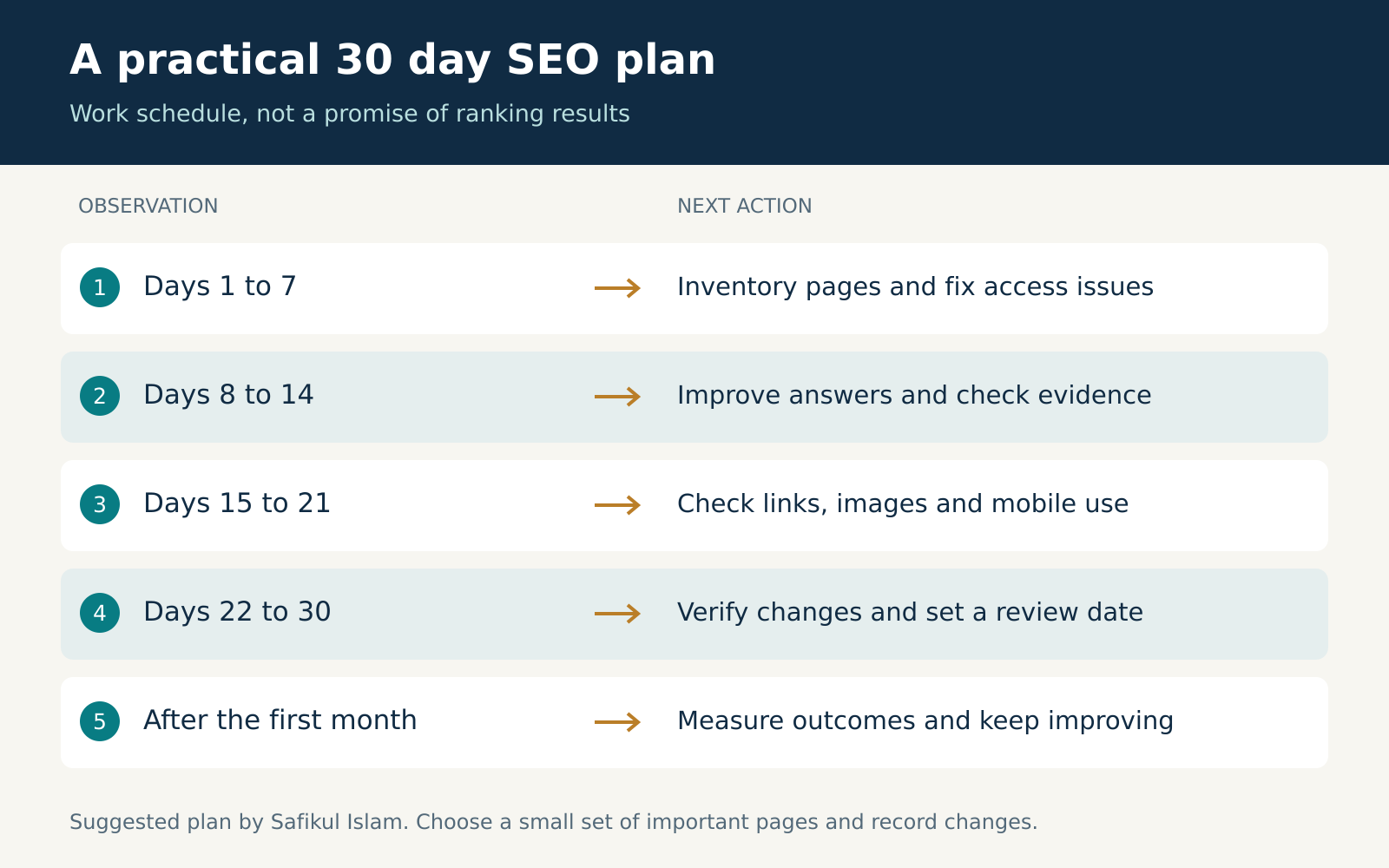
A practical 30 day SEO plan
This is a suggested work schedule. It is not a deadline for Google to index pages or improve rankings. Choose a small set of important pages so the team can finish and verify the work.
| Period | Focus | Completion evidence |
|---|---|---|
| Days 1 to 7 | Inventory and technical access | Page list, baseline observations and specific repair tickets |
| Days 8 to 14 | Intent and content improvements | Revised answers, checked sources and useful examples |
| Days 15 to 21 | Links, images and mobile experience | Working destinations, readable visuals and tested user tasks |
| Days 22 to 30 | Publish checks and measurement | Change log, verification record and next review date |
My checklist before publishing
- The page has one clear reader task and a distinct purpose in the archive.
- The opening answers the main question and the title accurately describes it.
- Important factual claims have reliable sources; examples and tests are labeled honestly.
- Internal links are relevant and their destinations work.
- Featured and body images are present, readable and appropriately described.
- The intended public URL is accessible and its canonical and indexing settings are correct.
- The mobile reading experience and next step have been checked.
- The owner has recorded what changed and when to review it.
Frequently asked questions
Which SEO best practice should a beginner start with?
Start with one useful public page. Check that it can be indexed, then confirm that its answer and format match the reader’s task. That gives subsequent title, link and performance improvements a clear purpose.
How often should I update an article?
Use a schedule based on how quickly its facts change. Review software instructions after interface changes and prices after plan updates. Keep stable explanations under review without changing their dates merely to look recent.
Do I need paid SEO tools?
You can begin with Search Console, manual page review and available diagnostic tools. A paid tool becomes useful when it solves a defined research or monitoring problem that your current process cannot handle efficiently.
Can these practices guarantee the first position?
No. Google’s SEO Starter Guide explicitly says there is no secret that automatically ranks a site first. Competition, query context and Google’s systems remain outside your control.
Should I create separate content only for AI search?
For Google’s AI features, start with the same useful, accessible pages. Build separate resources when readers have a genuinely different task, not simply to repeat an article with an AI-focused title.
Your next useful step
Pick one page and use the checklist to identify its biggest weakness. Assign a concrete improvement, verify the result and record the next review date. Repeat that process across the pages that matter most to your audience and business.