


A competitor ranking for a keyword you do not cover can suggest an opportunity. It does not automatically justify another blog post. The topic still needs to match your customers, your offer and something useful you can contribute.
Content gap analysis is the process of finding important questions or topics that your existing content does not answer well enough. Competitor keyword comparisons are one input. Customer conversations, support questions and your own search data can reveal gaps that a keyword export misses.
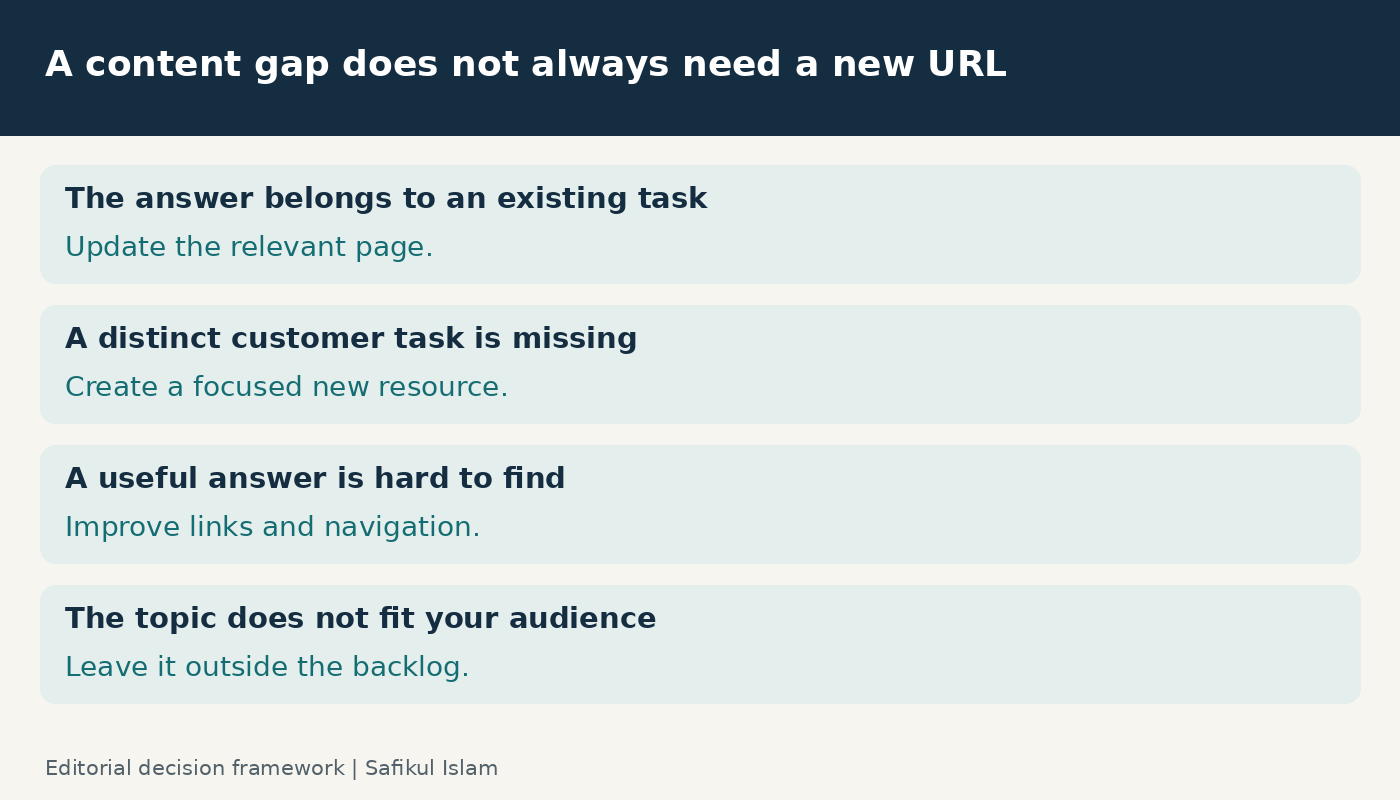
My approach starts with the reader’s problem and ends with a decision: improve an existing page, create a distinct new resource, or leave the topic alone.
Separate three kinds of content gaps
- Missing topic: you have no useful page for a relevant question.
- Incomplete answer: a relevant page exists, but it lacks an important explanation, example or decision step.
- Missing next step: readers learn the basics but cannot find the comparison, troubleshooting help or service information they need next.
A fourth situation is easy to mislabel: you already have a good answer, but it is hard to discover. That may call for clearer navigation, internal links or technical checks rather than additional copy.
For example, a WooCommerce setup guide and a checkout troubleshooting guide serve related but different tasks. A paragraph on checkout settings may fit the setup guide; a detailed diagnostic process can justify its own page.
Step 1: define the business boundary
Choose one audience and one service, product or content cluster. “Find every keyword our competitors rank for” is too broad for a useful first pass.
A practical brief might be: “Help small online-store owners diagnose common WooCommerce problems before deciding whether they need technical help.” This makes it easier to reject unrelated ecommerce news or broad shopping keywords.
Write down the action a satisfied reader might take next. It could be solving the problem independently, reading a more advanced guide, evaluating a service or contacting you. An informational article can be valuable without forcing every visitor into a sales form.
Step 2: inventory what you already have
List your relevant URLs with the main question, audience, format and last substantive review date. Add Search Console performance and business outcomes where available. Include useful pages with little search traffic: they may support customer onboarding or sales conversations.
Read the pages themselves. Titles alone can hide a strong answer buried halfway down an article. Likewise, a title that promises a complete guide may lead to outdated or shallow content.
For each potential opportunity, nominate the best existing destination before proposing a new URL. This simple habit helps prevent keyword cannibalization.
Step 3: choose actual search competitors
Your business competitors are not always the websites competing for the same search results. A software vendor’s documentation, a specialist blog or a discussion forum may be more useful to study than another local agency.
Search several representative queries for your chosen audience and region. Record the date, country and the kinds of results you see. Search results vary, so treat this as a research snapshot. Look for recurring relevant domains, then inspect the specific pages rather than assuming every topic on those domains belongs in your plan.
I would start with a small set of relevant competitors. Including huge general-interest sites can bury useful opportunities under thousands of irrelevant terms.
Step 4: collect evidence with or without a paid tool
Use a competitor keyword tool for breadth
Ahrefs documents a Content Gap workflow for finding keywords other sites rank for while yours does not. Its content gap guide also describes refining opportunities before acting on them.
Select the relevant country database and compare like-for-like sections when possible. Filter unrelated brands, locations you do not serve and queries outside your offer. Review the ranking pages behind the keywords. Estimated volume and difficulty help organize research, but neither proves that you can rank or that visitors will become customers.
Use a manual workflow for depth
Without a paid tool, combine your Search Console queries, customer questions and direct inspection of relevant search results. Note repeated tasks, unclear explanations and missing examples. You can use my Google Trends research guide to explore relative interest and seasonality; Trends is not an exact monthly search-volume counter.
Search Console describes queries where your site has appeared. It cannot provide a complete list of topics your site has never reached. That is why I combine it with external research rather than treating a missing query as proof of no demand.
Step 5: group queries by the job they represent
Several phrases may describe one task. “WooCommerce checkout keeps loading” and “checkout spinner will not stop” can belong to the same troubleshooting brief. Do not create separate articles merely because the wording differs.
Inspect search intent and the expected format. Does the reader want instructions, a comparison, a tool, a definition or a provider? Compare the actual problems addressed by the ranking pages, then decide what your audience needs.
Keep an evidence note for each group: customer question, Search Console query, competitor page, tool estimate or seasonal pattern. Record the source date and region. If demand is uncertain, mark it uncertain rather than replacing the missing evidence with an invented number.
Step 6: prioritize a short, useful backlog
I use four editorial questions rather than a complicated score that implies false precision:
- Customer fit: does this help someone we genuinely serve?
- Evidence: what shows that people need the answer?
- Contribution: can we add clear instructions, tested examples or expertise?
- Effort: can we create and maintain the resource properly?
Pick a small set you can finish. A commercially relevant troubleshooting answer may deserve attention before a much larger but unrelated keyword. Equally, low measured volume is not proof of high value; you still need a reason to prioritize it.
A worked example for a WordPress service business
Consider a hypothetical audit with three findings. The site already has a setup tutorial, customers repeatedly ask about missing shipping options, and a competitor publishes a broad ecommerce trends article.
Finding one: the setup guide omits a short verification checklist. Update that guide because the checklist belongs to the same task.
Finding two: shipping problems require a separate diagnostic sequence. Create or improve a focused troubleshooting page and link to it from the setup guide. On this site, the existing WooCommerce shipping troubleshooting guide is the kind of destination to inspect before commissioning another article.
Finding three: the trends article attracts broad interest but has little connection to the selected customer problem. Leave it outside this audit. A competitor’s coverage is evidence of their editorial choice, not an obligation for yours.
Step 7: write a brief with a clear contribution
Each approved brief should identify the reader, question, intended page, evidence, essential explanations, original contribution and next step. Include relevant internal links and primary sources that support technical claims.
Do not copy a competitor’s headings and add more words. A stronger contribution might be a decision tree, a reproducible example, a useful limitation or a clearer explanation of when a solution does not apply. Google’s people-first content guidance is a useful quality check.
For a business such as Leelija, I would connect the article to a service only when that connection helps the reader choose a sensible next step. The main answer should remain useful on its own.
Review what happens after publication
Record the publication or update date, the target URL and the intended outcome. Check that the page is accessible, indexable and linked from relevant existing pages. My internal linking guide covers that connection work.
Review discovery and performance over time using Search Console alongside analytics and actual customer feedback. Distinguish impressions, visits and qualified enquiries. One can improve without the others improving.
Revisit the backlog when your offer changes, customer questions shift or existing answers become outdated. A calendar review is useful, but the evidence should decide what gets rewritten.
Frequently asked questions
Is content gap analysis the same as keyword research?
They overlap. Keyword research explores search demand; a content gap analysis compares relevant needs with what you already cover and decides what to improve or create.
Do I need a paid tool?
No. A manual audit can work well for a small topic cluster. Paid tools expand the comparison, but you still need to judge relevance and read the pages.
Should every gap become a new article?
No. Some belong in an existing page, some need clearer links, and some are not worth pursuing. Give each approved idea a destination and a reason before writing.
The goal is a more useful content library. Start with one customer problem, inspect the pages you already have and select the next improvement you can support with evidence.