


Two pages appearing for the same keyword can look like an SEO problem. Sometimes it is. Sometimes those pages help different people and deserve to stay. Before I merge anything, I want to know which situation I am looking at.
Keyword cannibalization is harmful competition between pages on the same website that serve the same or closely overlapping search intent. Repeating a phrase across your website is not enough to prove it. The useful question is whether your current pages make it harder for visitors to find the right answer and for the site to earn relevant traffic.
This guide explains how I would investigate an overlap, choose a proportionate fix, and check the result without deleting useful content on a hunch.
What keyword cannibalization looks like
Imagine a small agency publishes “WordPress SEO Checklist” and later publishes “Complete WordPress SEO Checklist.” Both explain the same setup tasks to beginners. Neither provides a clearly different reason to visit. Internal links point inconsistently to both, and both need maintenance whenever the software changes.
That is a candidate for investigation. By comparison, a WordPress SEO service page and a tutorial can share vocabulary while serving different needs: hiring someone and doing the work yourself. I would not combine them just because both mention WordPress SEO.
Ahrefs makes this distinction in its definition: the overlap matters when it hurts overall performance. Multiple URLs alone are a clue, not a verdict.
Start with a page inventory
Choose one topic cluster rather than auditing your whole website at once. Search your CMS for its main phrases and list the URLs, titles, publication dates and page purposes. Include older posts, service pages and category pages where relevant.
A site search can uncover candidates, but it is not a complete inventory or a dependable ranking report. Check your CMS export and sitemap as well. For each candidate, finish this sentence: “This page helps this reader complete this task.” If two sentences are effectively identical, inspect those pages together.
- Record the primary question each page answers.
- Note unique examples, downloads, useful backlinks and business enquiries.
- Check whether the page still reflects your current services or product.
- Identify internal links that send readers to it.
Use Search Console to test the suspicion
Open the Search results performance report and choose a useful date range. Three months can be a starting point; low-traffic or seasonal sites may need a longer period. Filter a relevant query and inspect the Pages tab. Compare the candidate URLs, then repeat for related queries.
Keep country, device and search type consistent when comparing periods. An apparent URL switch can reflect a different audience or query mix. Review clicks, impressions, click-through rate and position together, rather than treating one average-position movement as proof.
Google’s performance-report documentation explains these dimensions and metrics. If you need help getting started, use my Google Search Console guide.
Search Console does not expose every query, so missing rows do not prove that a page has no search value. Also inspect the page’s broader query set and your analytics or enquiry records. A page that contributes fewer clicks may still attract the customers you want.
My working evidence threshold is a combination: substantially overlapping purpose, unclear page differentiation, and a plausible performance or user-experience problem. This is an editorial decision framework, not a Google scoring formula.
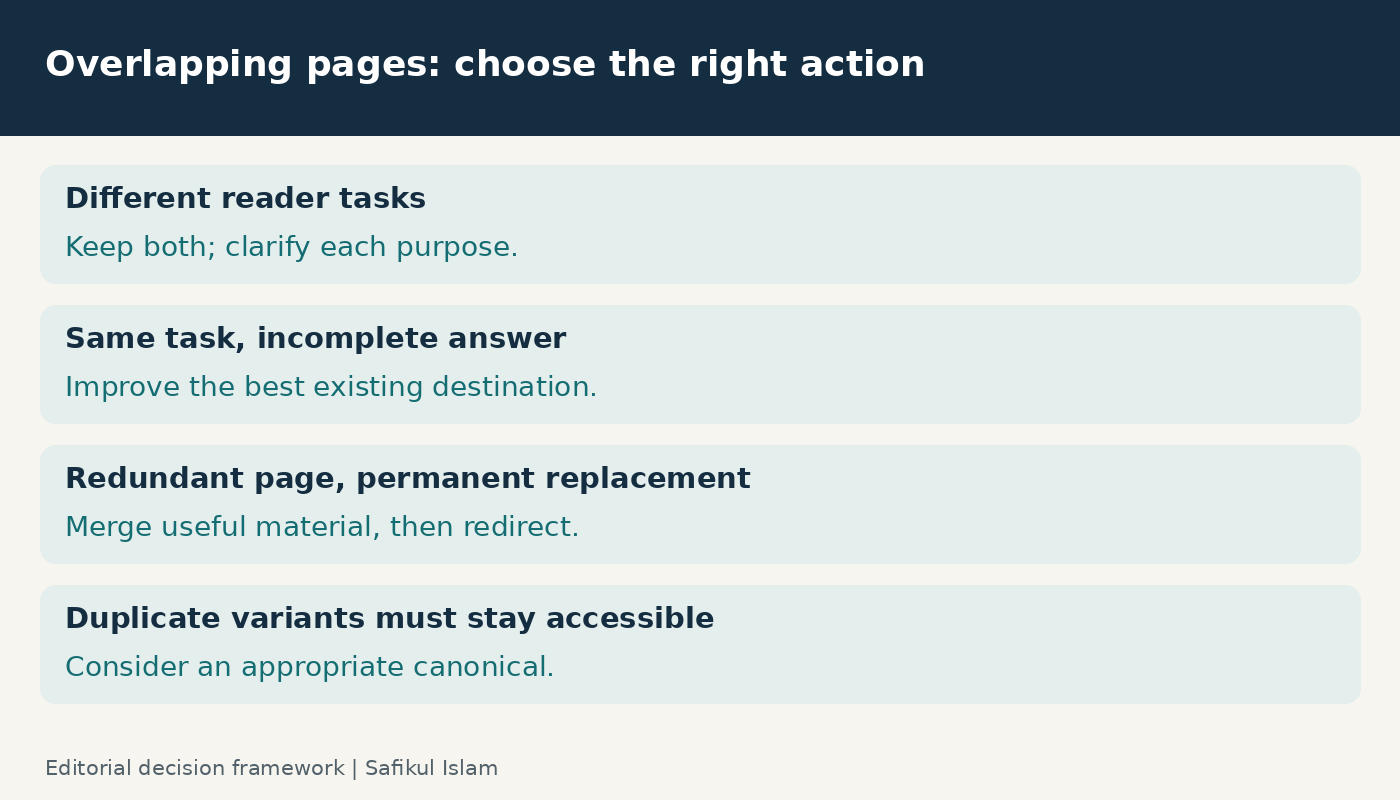
Choose the smallest useful change
Keep both pages when their purposes differ
Make that difference explicit in the title, introduction and navigation. A service page should explain the service, suitability and next step. A tutorial should help the reader perform the task. Link between them where that next step is useful, without turning both into the same mixed-purpose page.
Improve an existing page when the answer is incomplete
Sometimes the “competing” article exists because the original guide was missing a section. If the new material belongs naturally in the original guide, incorporate it there. Preserve genuinely useful examples instead of simply choosing the newer URL.
Consider relevance, existing traffic, links, conversions and URL stability when selecting the destination. None of these should automatically outweigh a poor match to the reader’s task.
Merge and redirect when a page is truly replaced
For two redundant guides, build the complete replacement first. Then redirect the retired URL directly to the relevant destination. Google documents permanent redirects such as 301 and 308 for permanent moves. Avoid sending unrelated articles to the homepage.
Update internal links so they point directly to the retained URL, remove the retired URL from your current sitemap, and test the redirect. Check that the destination loads successfully, remains indexable and contains the material you intended to preserve. Keep a record of the change and a backup of the original copy.
Use canonicals only for an appropriate duplicate case
A canonical is not a universal repair for two different articles. Google’s canonical guidance concerns duplicate or very similar pages. Where variants must remain accessible, a canonical can indicate the preferred version. It is a signal, and Google can select a different canonical.
If your pages answer different questions, clarify their purpose. Do not canonicalize an informative guide to a sales page simply because you prefer the sales page to rank.
A worked example: two overlapping checklists
Here is a hypothetical example, not a client result. An agency has a general WordPress SEO checklist and a newer checklist with almost the same steps plus a useful indexing troubleshooting section.
I would first check whether the troubleshooting section deserves a separate guide. If it is only a short extension of the same task, I would update the stronger existing checklist with that material and redirect the redundant checklist after the replacement is ready. If it is a substantial diagnostic workflow with a different search intent, I would keep it separate and narrow its title and introduction.
The decision depends on what the reader needs to do. Word count and publication date do not settle it.
Measure the whole topic after the change
Save a baseline before editing: the relevant queries, URLs, clicks, impressions and business outcomes. Annotate the publication or redirect date. Compare equivalent periods after Google has had time to recrawl and process the changes; there is no universal recovery timetable.
Look at combined performance across the topic. A retired URL losing traffic is expected after a redirect. The more useful question is whether the replacement and the topic cluster now serve visitors better. Account for seasonality, sitewide changes and shifts in demand before attributing every movement to your edit.
For the link cleanup, my internal linking guide explains how to connect supporting articles to the most relevant destination.
Prevent the next overlap
Before commissioning a new article, search your existing library and assign the brief an intended reader, main question and destination URL. Decide whether it needs a new page or an update. A simple shared content map is often enough for a small team.
I would rather maintain a clear set of useful pages than create a fresh URL for every keyword variation. Pair this process with content gap analysis to identify missing answers without duplicating what you already cover.
Frequently asked questions
Is keyword cannibalization a Google penalty?
The term describes a potential performance problem from overlapping content. It is not evidence that Google has applied a manual penalty. Investigate the pages and data before choosing a fix.
Can two pages rank for the same keyword?
Yes. Different pages can satisfy different interpretations of a query. Keep useful pages when they have distinct purposes and contribute value.
Should I delete the page with less traffic?
No. Check its other queries, links, conversions and unique information first. If it is genuinely redundant, prepare a relevant replacement and redirect plan before retiring it.
Start with one overlapping pair, document your reasoning and review the result. That makes the audit manageable and helps you avoid turning an uncertain diagnosis into an unnecessary sitewide change.
Pingback: Content Gap Analysis: A Practical Guide for Businesses