

Most guides to AI business automation are really just Zapier reviews with a longer title. That’s not wrong, exactly, but it misses the actual shift that happened in the last year: the tools themselves stopped being simple “when this happens, do that” triggers and started being able to reason through messy, unstructured input on their own. That distinction changes which tool you should actually pick, and almost nobody explains it in plain terms.
This guide covers what AI business automation actually means now, when you need a true AI agent versus a simpler workflow tool, the free options worth trying first, and a framework for choosing without ending up with five overlapping subscriptions. If you’re newer to the automation mindset generally, my growth hacking guides cover the broader habit of fixing one bottleneck at a time, which this whole guide assumes.
What “AI business automation” actually means in 2026
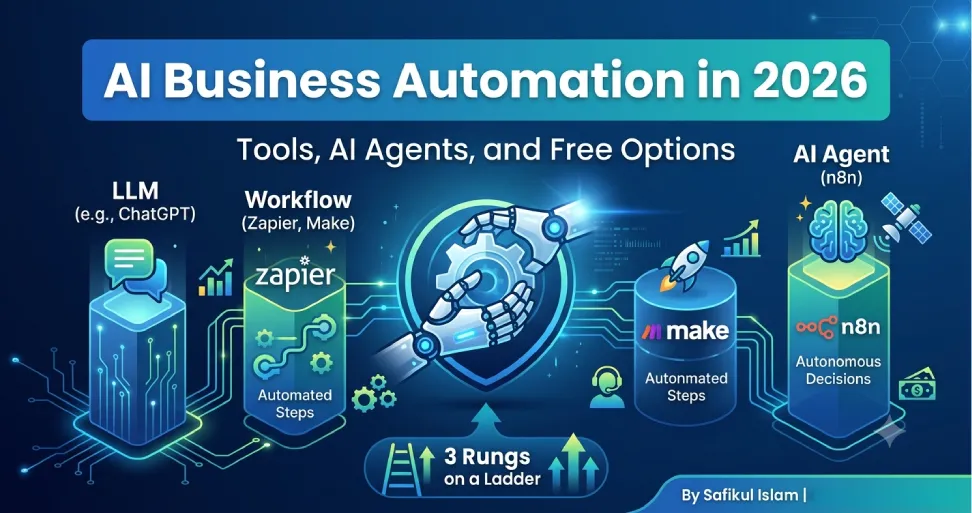
It helps to think of this as three rungs on a ladder, each doing something the one below it can’t. The first rung is a plain LLM like ChatGPT or Claude: you type a prompt, you get an answer, and it can’t act on anything by itself. The second rung is workflow automation, which is what Zapier, Make, and the early version of n8n did well for years: a trigger fires, and a fixed sequence of actions runs. The third rung is an AI agent, where the model itself decides what to do next based on what it finds, rather than following a script you wrote in advance.
Anthropic’s own engineering team draws this distinction clearly in its write-up on building effective agents: a workflow runs through predefined code paths, while an agent dynamically directs its own process and tool use. That’s not a marketing distinction; it’s an architectural one, and it’s the reason “AI business automation” in 2026 covers a much wider range of tools than it did two years ago.
Most small businesses don’t need rung three for most tasks. Moving a new lead from a form into your CRM doesn’t need judgment; it needs a reliable trigger. Reading an unstructured support email, deciding what it’s actually asking, and drafting a response that fits the context does need judgment, which is where an agent earns its keep.
AI agents vs. workflow automation: what to actually use
The three platforms most businesses land on, Zapier, Make, and n8n, have all added agent capabilities in the past year, but they didn’t converge on the same thing, and the differences matter more than the marketing pages suggest.
Zapier
Zapier added Zapier Agents for autonomous task execution across its catalog of over 8,000 connected apps, plus an AI Copilot that builds Zaps from a plain-English description. It’s the easiest of the three to set up with no technical background. The trade-off is billing: Zapier charges per task, and every individual action in a multi-step Zap counts separately, so a 10-step automation firing 1,000 times a month can burn through 10,000 billable tasks fast. Its free plan gives you 100 tasks a month to test the idea before you commit.
Make
Make shipped its own AI Agents feature alongside Maia, an assistant that builds a working scenario from a written description, inside the same visual canvas it’s always used. Make bills by “operations,” and every module in a scenario counts, including branches and loops, so a 5-module scenario running 1,000 times a month can use 5,000 operations. Its free plan includes 1,000 operations a month with no time limit, which is enough to properly test a real workflow before paying anything.
n8n
n8n went the furthest technically: its 2.0 release added a dedicated AI Agent node with native LangChain support, tool-calling, and memory that persists across runs, which is what you actually need for an agent handling a multi-step task rather than a single reply. Its billing model is also structurally different: one execution covers an entire workflow run regardless of how many steps it contains, which tends to make complex, high-volume automations far cheaper than task- or operation-based billing once you scale past a few thousand runs a month. n8n also has a free, self-hostable Community Edition with no execution cap, though “free” here means you’re running your own server, not that there’s zero cost or setup effort.
My honest read: if you have no technical resources and want something working today, start with Zapier or Make. If you’re building anything that needs to hold context across steps, judge unstructured input, or scale past a few thousand runs a month, n8n’s architecture is built for exactly that, and it’s worth the steeper learning curve.
Free AI tools for business automation in 2026
A genuinely usable free stack exists in 2026, but “free” means different things depending on the tool. Here’s what each one actually gets you at no cost:
- n8n Community Edition — free, unlimited executions, self-hosted. The real cost is a small VPS (often $5–10/month) and the time to set it up. Best if you’re comfortable with basic server admin or have someone who is.
- Make Free plan — 1,000 operations a month, no time limit. Good for testing one or two real scenarios before deciding whether to pay.
- Zapier Free plan — 100 tasks a month, two-step Zaps. Enough to validate that an automation idea actually saves time before you commit a budget.
- ChatGPT and Claude free tiers — not automation tools by themselves, but useful for drafting the actual prompt or logic you’ll plug into whichever automation platform you choose. If you’re weighing whether a chatbot belongs in your customer-facing workflow specifically, I cover that separately in what an AI chatbot is and how to implement one.
- HubSpot free CRM — covers up to two users and gives your automations somewhere to write lead and contact data, rather than scattering it across spreadsheets.
The honest caveat, same as with any free tier: it’s genuinely usable for testing whether a workflow is worth automating, not necessarily for running your whole operation on indefinitely. Expect to outgrow it once an automation becomes something the business actually depends on.
Where AI business process automation fits into bigger operations
If your business is past the point of a handful of workflows and into automating entire departments, that’s the territory of traditional robotic process automation (RPA) platforms like UiPath and Automation Anywhere, both of which have added AI agents and generative workflow-building on top of their existing automation engines. That’s a different buying decision than picking a tool for one team’s workflow: it usually involves procurement, IT governance, and a longer implementation timeline, and it’s overkill for most small and mid-sized businesses reading this.
If you’re not already running RPA at that scale, you almost certainly don’t need it yet. Start with the specific process costing you the most time, automate that with Zapier, Make, or n8n, and only look at enterprise RPA once you have more automated processes than any one no-code tool can reasonably manage.
A simple framework for choosing
- Name the actual bottleneck before naming a tool. “We need AI automation” isn’t specific enough to act on; “we spend four hours a week manually triaging support emails” is.
- Decide whether the task needs judgment or just needs to happen reliably. Reliable, repeatable steps want a workflow tool. Judgment calls on messy input want an agent.
- Test on the free tier with your actual, messy real-world data, not a clean demo example, before paying for anything.
- Check the billing model before you scale, not after. Task-based and operation-based billing can surprise you once volume grows; know which model you’re on.
- Automate one process fully before starting the next one. A half-automated process with no one checking it is often worse than the manual version it replaced.
Common mistakes that quietly cost money
- Automating a process that was already broken. Automation makes a good process faster and a bad process fail faster and more often.
- No human checkpoint on anything customer-facing or financial. Every platform here supports approval steps; skipping them to save a click is how a small mistake becomes a visible one.
- Building the most technically impressive automation instead of the one that actually saves the most time. A 15-step agentic workflow that automates a task nobody does often is a worse investment than a 2-step Zap that runs 500 times a month.
- Never revisit pricing. Free tiers and “starter” pricing pages for these tools have changed structure more than once in 2026 already; what you signed up for in January may not be what you’re billed under in December.
Frequently asked questions
No. Every platform covered here has a usable free or low-cost entry point specifically because small teams are a large part of who adopts them first. The judgment call is which tool fits your technical comfort level, not whether you’re big enough to bother.
If the task follows the same steps every time regardless of input, a workflow tool is simpler, cheaper, and more predictable. Reach for an agent only when the task genuinely requires judging unstructured input and deciding what to do next, since agents are harder to fully predict and typically cost more to run.
Start on a free tier (n8n self-hosted, Make’s free plan, or Zapier’s free plan) with one real, painful manual task, and only upgrade once that single automation is something you’d genuinely miss if it stopped working.
Traditional business process automation follows fixed rules and struggles with anything unstructured, like a free-text email or an inconsistent PDF. AI-driven process automation can read and interpret that unstructured input and decide what should happen next, which is what makes it useful for tasks that used to require a person to read something and use judgment first.