


Short answer: Cart, Checkout, My Account and the Order Received (thank you) page always need to stay out of page cache, along with the wc-ajax and Store API requests that power them and the add-to-cart query string. Get this wrong and the usual result isn’t a slow page, it’s a customer seeing someone else’s cart, a stuck checkout, or a payment confirmation that never updates. I’ve seen that exact failure mode discussed on WooCommerce’s own GitHub issue tracker, where a caching misconfiguration led to other customers’ items showing up in someone’s cart. That’s the real stake here, not just a page-speed score.
This guide covers the full exclusion list, why each item matters, how the major caching plugins and Cloudflare actually handle it, a smarter alternative to excluding whole pages, and how to verify your setup is actually working rather than assuming it is.
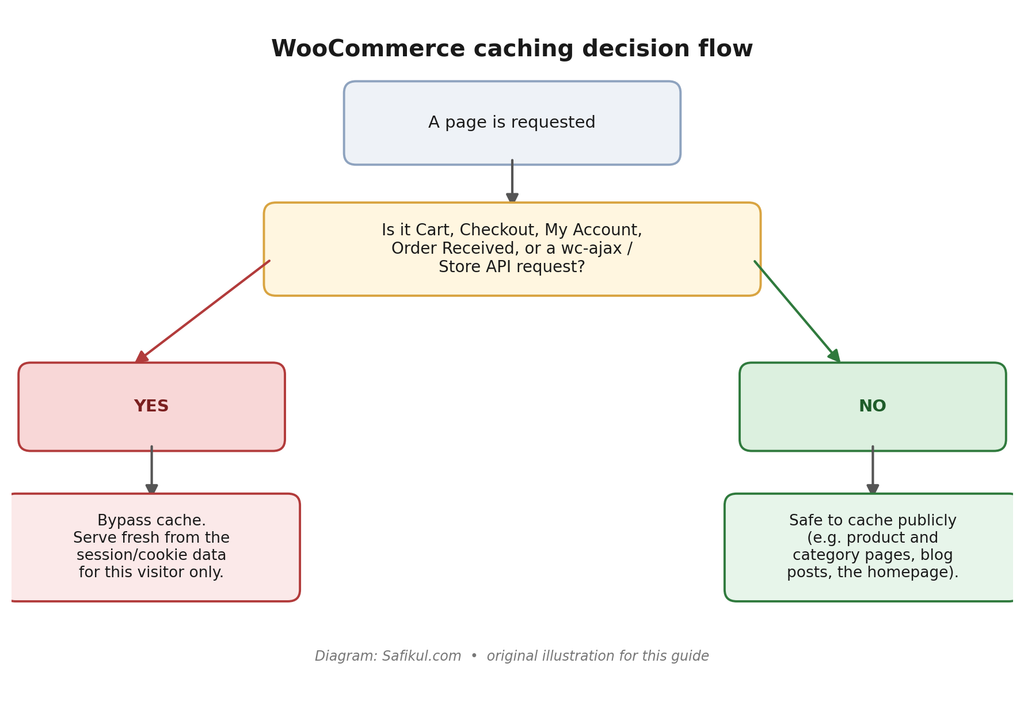
The WooCommerce pages that must never be cached
This list comes directly from WooCommerce’s own developer documentation, with one addition (the order-received page) that’s standard practice across every major caching plugin’s own guidance even though it isn’t spelled out on that specific page:
- Cart (/cart/) — shows the current visitor’s items, quantities and totals.
- Checkout (/checkout/) — handles live order totals, shipping, and payment form state, and generates a per-session security nonce.
- My Account (/my-account/) — order history, saved addresses, downloads and account details, all specific to the logged-in customer.
- Order Received / Thank You page (/checkout/order-received/) — confirms a specific customer’s specific order; caching it can show one customer’s order confirmation to someone else, or a stale status to the same customer on reload.
These pages need to stay dynamic because they display information specific to the current customer and their cart, exactly as WooCommerce’s own documentation puts it. A cached copy of any of them is, by definition, showing one visitor data that was generated for a different visit.
Why this isn’t just a performance setting
It’s tempting to treat cache exclusions as a minor speed-vs-correctness tradeoff. The real-world reports are more serious than that. In WooCommerce core issue #15671, store owners reported customers seeing products in their cart that they never added, traced back to cart and checkout pages being served from a shared cache instead of generated per visitor. One comment in that thread sums up the fix plainly: ensure checkout and cart are excluded from caching, since that’s “often related” to exactly this symptom.
If you’re troubleshooting “WooCommerce cart showing wrong items,” “WooCommerce cart not updating,” or an intermittent “WooCommerce checkout nonce error,” a caching misconfiguration should be one of the first things you rule out, not the last.
Cookies, endpoints and query strings that need the same treatment
Excluding the right pages isn’t the whole job. A caching system that only checks the URL path can still cache a cart-related AJAX response or an endpoint that doesn’t live under /cart/ at all.
WooCommerce session cookies
Per WooCommerce’s own documentation, these cookies should trigger a cache bypass wherever your caching system supports cookie-based rules:
| Cookie | Lifetime | Purpose |
| woocommerce_cart_hash | Session | Helps WooCommerce detect when cart contents change |
| woocommerce_items_in_cart | Session | Same purpose; flags that the cart is non-empty |
| wp_woocommerce_session_ | 2 days | Points to this specific customer’s session data in the database |
| woocommerce_recently_viewed | Session | Powers the Recently Viewed Products widget |
wc-ajax, the Store API, and add-to-cart requests
The classic cart/checkout flow uses wc-ajax requests (?wc-ajax=update_order_review and similar) to refresh totals without a full page reload. The newer block-based Cart and Checkout talk to the Store API instead, under paths like /wc/store/. Both need to bypass cache, as do add-to-cart requests using the ?add-to-cart= query string, which is exactly the pattern WooCommerce’s own Varnish configuration example excludes. If you’ve recently added the newer block checkout to your store, revisit your exclusion rules; a rule written only for the old ?wc-ajax= pattern won’t catch Store API traffic.
How the major caching plugins actually handle this
Coverage varies more than most guides admit. Some plugins detect WooCommerce and configure these exclusions for you; at least one popular plugin does not.
WP Rocket
WP Rocket is fully compatible with WooCommerce and automatically detects and excludes Cart, Checkout and My Account on activation, no manual configuration required for the core pages.
LiteSpeed Cache
LiteSpeed Cache also auto-detects and excludes /cart/, /checkout/ and /my-account/, but it offers something the others don’t: ESI (Edge Side Includes), covered in its own section below. ESI requires LiteSpeed Enterprise or QUIC.cloud; it isn’t available on every LiteSpeed install.
WP Super Cache
Per WooCommerce’s own documentation, WP Super Cache is natively compatible: WooCommerce sends information to it so that it doesn’t cache Cart, Checkout or My Account by default.
W3 Total Cache
This is the one worth double-checking: W3 Total Cache does not auto-detect WooCommerce’s pages. You need to add Cart, Checkout and the order-received path manually under Performance > Page Cache > Advanced > Never Cache The Following Pages. If you migrated to W3TC from a plugin that auto-excludes, don’t assume the same protection carried over.
FlyingPress
FlyingPress detects WooCommerce automatically and excludes Cart, Checkout and My Account on activation, and separately supports clearing product-page cache automatically when stock levels change, a smaller but genuinely useful WooCommerce-specific feature.
Cloudflare and CDN-level caching
If you cache at the CDN/edge layer as well as (or instead of) a WordPress plugin, the same exclusions need to exist there too, and Cloudflare specifically has changed how this works. The older Page Rules feature reserved “Bypass Cache on Cookie” for Business and Enterprise plans only; the newer Cache Rules feature supports cookie-based bypass expressions on more plans, and behaves differently enough from Page Rules that a working Page Rules setup isn’t guaranteed to carry over automatically.
Cloudflare’s Automatic Platform Optimization (APO) for WordPress already recognizes common WooCommerce cookies out of the box and bypasses its cache when it sees them, including woocommerce_items_in_cart. That said, APO’s built-in recognition won’t extend to a custom pricing, membership or currency-switcher plugin that sets its own cookie; those need to be added to your exclusion list by hand.
Whichever Cloudflare feature you use, the practical rule is the same as everywhere else in this guide: bypass cache for the cart, checkout, account and order-received paths, for wc-ajax and Store API requests, and for the WooCommerce session cookies, and test the full purchase path afterward.
A smarter alternative to excluding whole pages: ESI
Everything above describes exclusion: marking a page or request as “don’t cache this.” That’s correct and necessary for cart, checkout, my-account and order-received. But it has a cost on pages that are mostly static except for one small dynamic element, most commonly a product page with a mini-cart or “items in cart” count in the header.
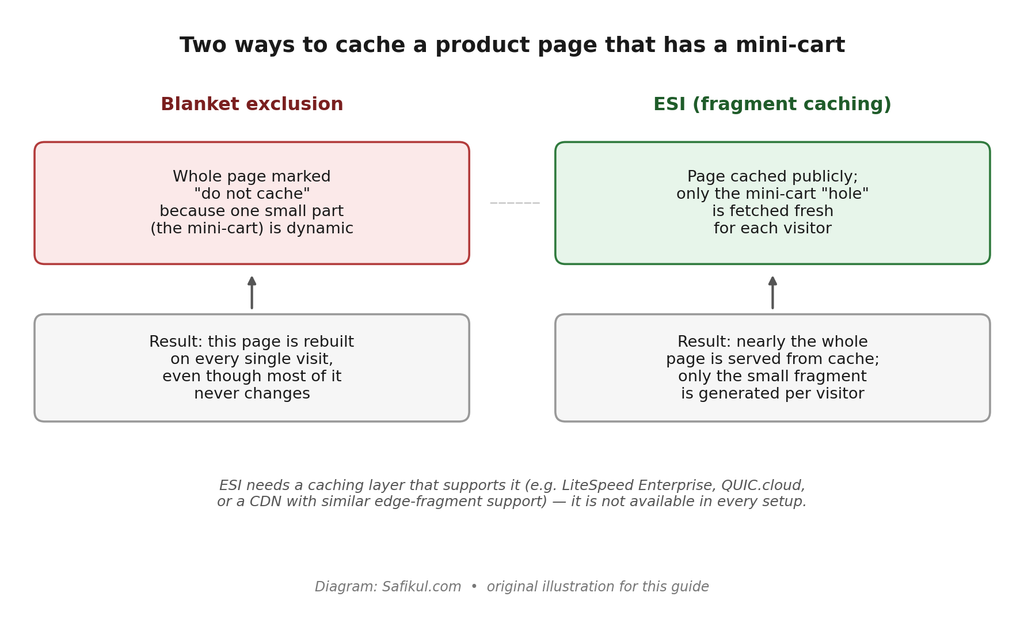
Edge Side Includes (ESI), supported by LiteSpeed Cache and available through some CDNs, solves this by caching the page publicly while leaving a “hole” for the dynamic fragment, which is fetched fresh for each visitor. The product description, images and reviews stay cached; only the mini-cart updates per request. This is the detail most WooCommerce caching guides skip entirely, and it’s the difference between excluding a handful of core pages and accidentally decaching your entire product catalog because of one small cart widget in the header.
ESI isn’t universal: it needs a caching layer built to support it, and some plugin combinations have had rough edges (an ESI block that fails silently, or a misconfigured product/page association serving the wrong fragment). If you don’t have ESI available, blanket exclusion of the pages above is still the correct, safe default.
How to verify your exclusions are actually working
Don’t assume a setting took effect. Check it directly.
- Open a private/incognito browser window and visit your cart page. Check the response headers (browser dev tools > Network tab) for a cache-status header such as X-LiteSpeed-Cache, X-Cache, or cf-cache-status. It should show a miss, bypass, or dynamic status, never a hit, on cart, checkout, my-account and order-received.
- Add an item to your cart in one browser, then open the site in a second, fully separate browser (or private window) and confirm the second session shows an empty cart, not the first session’s items.
- Complete a full test purchase end to end, including reaching the order-received page, and reload that page once to confirm it still shows the correct order rather than a cached, possibly different, confirmation.
- If you use a command line, a quick check from the terminal works too: curl -sI https://yoursite.com/cart/ and look for the same cache-status header.
A step-by-step setup checklist
- 1. Identify your caching layer(s): WordPress plugin, hosting-level cache, CDN, or more than one stacked together.
- 2. Confirm whether your plugin auto-excludes WooCommerce pages (WP Rocket, LiteSpeed Cache, WP Super Cache and FlyingPress do; W3 Total Cache does not).
- 3. Manually add Cart, Checkout, My Account and Order Received to the exclusion list regardless, as a safety net.
- 4. Add the WooCommerce session cookies to your cookie-exclusion or cache-variation list.
- 5. Add wc-ajax and /wc/store/ (Store API) request paths, and the ?add-to-cart= query string, to your exclusion rules.
- 6. Repeat steps 2–5 for any CDN or edge cache layer in front of WordPress; a plugin-level exclusion does not automatically apply at the CDN.
- 7. Verify using the checks in the previous section before considering the setup finished.
- 8. Re-test after any change to checkout flow, payment gateway, or a new plugin that adds its own session cookie (a currency switcher or wishlist plugin, for example).
Frequently asked questions
Cart, Checkout, My Account and the Order Received (thank you) page. These display information specific to the current customer and should always bypass page cache.
Yes. Since WooCommerce 1.4.2, WooCommerce sets the DONOTCACHEPAGE constant on cart, checkout and account pages. A caching plugin only respects this automatically if it’s built to support that constant; if it isn’t, the pages need to be excluded manually inside that plugin’s own settings.
The most common cause is a caching layer serving a shared, cached version of the cart or checkout page instead of generating it per visitor. This exact symptom is documented in WooCommerce’s own GitHub issue tracker; confirm the pages and cookies in this guide are genuinely excluded, not just assumed to be.
Yes, and this is the page most guides forget. It confirms a specific order for a specific customer; caching it risks showing one customer’s confirmation to another, or a stale status on reload.
No. If Cloudflare (or another CDN) caches pages at the edge, it needs its own exclusion rules, separate from your WordPress plugin’s settings. Use Cloudflare’s Cache Rules (not the older Page Rules) with a bypass expression covering the same pages, cookies and paths described in this guide, and test the full purchase path afterward.
Edge Side Includes lets a page be cached publicly while one small dynamic piece (commonly a mini-cart) is fetched fresh per visitor, instead of excluding the whole page. It’s a performance optimization, not a requirement; if your caching layer doesn’t support it, correctly excluding the pages, cookies and endpoints in this guide is sufficient and safe on its own.