

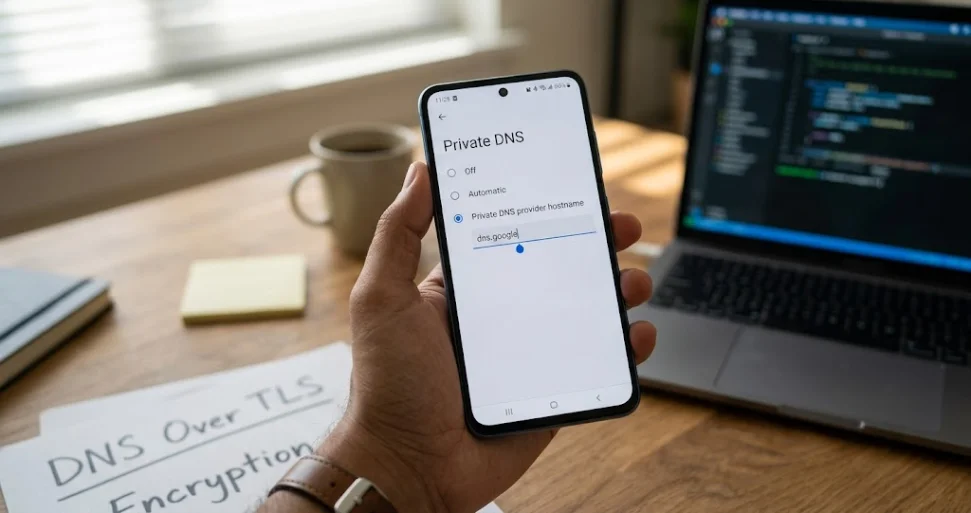
Private DNS on Android is a setting that can encrypt DNS queries and responses between your phone and a DNS resolver. It helps protect domain-name lookups from being read or changed on that connection. Automatic mode uses encryption when available; a specified provider hostname requires a secure connection to that provider.
It does not hide your IP address, make you anonymous, or encrypt everything you do online.
For me, the useful question is whether a setting solves a real problem without making daily work harder. If you use your phone for business, banking, research, or travel, Private DNS is worth understanding. You should also know what happens when the selected provider is unavailable.
This guide explains the three Android modes, provides official provider hostnames, and shows how to check the setup and fix common connection problems.
What is private DNS
The phrase has two common meanings.
On Android, Private DNS refers to a device feature for encrypted DNS resolution. In business networking, a private DNS service can instead mean a system that resolves names for internal resources, such as servers inside a company’s virtual network.
Those are different uses of the word “private.” One concerns the privacy of DNS transport. The other concerns where particular domain names are resolvable.
A publicly available resolver can support Android Private DNS. You do not need to own a server or buy a private domain to use the setting.
First, understand what DNS does
The Domain Name System helps translate website names into network addresses. When you enter a domain such as safikul.com, your device needs address information before it can connect.
A DNS resolver obtains the answer, often using a cached record. If the answer is not cached, it may need to query other DNS servers. This process happens behind ordinary browsing and many app connections.
Traditional DNS can travel without encryption, exposing queried domain names to observers along the connection. Encrypting that exchange reduces this exposure. It does not turn the DNS resolver into the website you are visiting.
For a fuller explanation of recursive resolvers, authoritative servers, and caching, see Cloudflare’s DNS introduction.
What is Private DNS mode on Android?
Private DNS mode controls how Android’s system resolver handles encrypted DNS. The familiar choices are Off, Automatic, and Private DNS provider hostname.
Android introduced built-in Private DNS with DNS over TLS in Android 9. Google later added DNS over HTTP/3 support for supported configurations. Therefore, describing every current Android Private DNS connection as “always DNS over TLS” is too broad.
Google’s Android DNS over HTTP/3 announcement explains that evolution. The actual transport depends on the device’s software and resolver support; you still configure the user-facing Private DNS setting rather than choosing an arbitrary HTTPS URL.
One scope detail worth knowing before you pick a provider hostname below: the HTTP/3 upgrade currently applies only to Android’s two predefined, well-known resolvers, Google Public DNS and Cloudflare. If you enter one of those, Android 11 and later use DoH3 automatically. If you enter a different provider hostname, including Quad9 or Cloudflare’s own security and family filtering subdomains, the connection still uses the older DNS over TLS rather than DoH3. Google has described plans to expand this through automatic resolver discovery, but as of this writing the upgrade itself is not provider-independent.
Off
Off disables this system Private DNS feature. It does not prove that every app sends unencrypted DNS: a browser, VPN, or other application may manage DNS separately.
Automatic
Automatic attempts encrypted DNS with the network’s resolver when supported. It can fall back to ordinary DNS if the secure connection is unavailable.
The practical point is that Automatic prioritizes keeping lookups working. It should not be read as a guarantee that every lookup is encrypted on every network. Google describes the original opportunistic behavior in its Public DNS setup documentation.
Private DNS provider hostname
This option lets you specify a compatible resolver by hostname. It is commonly called strict mode because it requires the secure provider connection instead of silently switching those system lookups to unencrypted DNS.
If Android cannot validate or reach the provider, domain resolution can fail and the device may report a connectivity problem. The original Android Private DNS announcement describes this behavior.
| Mode | Resolver choice | If encrypted DNS is unavailable |
|---|---|---|
| Off | Normally the network’s resolver | System Private DNS is disabled |
| Automatic | Normally the network’s resolver | Unencrypted fallback is possible |
| Provider hostname | The compatible provider you specify | Secure lookup fails rather than silently downgrading |
I would choose between Automatic and a hostname based on whether continuity or a strict encryption requirement matters more for the intended use.
Should Private DNS be on or off
For a personal Android phone, keeping Private DNS enabled is a reasonable starting point. Google’s Android network settings guide recommends keeping it on.
My practical recommendation is:
- Choose Automatic if you want a simple default and understand that encryption is not guaranteed.
- Choose a provider hostname if you want a specific resolver and accept that connection failures may need troubleshooting.
- Use Off temporarily when diagnosing a suspected conflict, or follow a managed network’s instructions.
Before changing a company-owned phone, ask which DNS configuration the business supports. A setting that works well at home may not resolve an internal dashboard or preserve workplace filtering.
How to set up Private DNS on Android
The built-in feature is available on Android 9 and later, although menu names vary by manufacturer.
1. Open Settings on your Android phone.
2. Search Settings for Private DNS. On many devices, it appears under Network & internet.
3. Open Private DNS.
4. Select Private DNS provider hostname.
5. Enter the hostname supplied by your chosen provider.
6. Tap Save, then test your normal apps and websites.
For example, enter dns. google to use Google Public DNS. Use only the hostname in this field. Do not add https://, /dns-query, spaces, or a page address copied from a browser.
If you only want Automatic mode, select Automatic and save instead. You do not need to enter a hostname for that option.
I suggest noting your original setting first. It makes troubleshooting much easier if you can return to a known working configuration.
For more practical device and software walkthroughs, explore my app guides.
Private DNS provider hostnames you can use
The following hostnames come from the providers’ own documentation. They are configuration values, not rankings or speed-test results.
| Provider or service | Provider hostname | Main distinction |
|---|---|---|
| Google Public DNS | dns.google | General public DNS resolution |
| Cloudflare standard resolver | one.one.one.one | General public DNS resolution |
| Quad9 recommended service | dns.quad9.net | Malware blocking and DNSSEC validation |
| Cloudflare malware filtering | security.cloudflare-dns.com | Blocks known malware domains |
| Cloudflare family filtering | family.cloudflare-dns.com | Malware and adult-content filtering |
Check Google’s setup guide, Cloudflare’s Android instructions, and Quad9’s Android guide before making changes.
Do not confuse a provider’s free recursive DNS service with its separate website hosting, authoritative DNS, or business security products. You generally do not need to purchase a website plan to enter a public resolver hostname on your phone.
Choose according to the problem you want to solve. If the goal is encrypted resolution, a general resolver may suit you. If the goal includes domain blocking, select a service that explicitly provides the required filtering.
What Private DNS protects and what it does not
The protection is specific: encrypted queries and replies between the client and resolver are harder for an observer on that path to read or manipulate.
The DNS provider still receives the questions it must answer. Your trust moves partly to that provider, so review its logging and data-use policies. Google Public DNS’s privacy policy, for example, distinguishes temporary and permanent logs. “Encrypted” does not automatically mean “nothing is logged.”
| It can help with | It does not automatically provide |
|---|---|
| Protecting DNS query contents in transit | Complete anonymity |
| Reducing interference with the encrypted exchange | IP address masking |
| Using a selected DNS resolver | Encryption of all app traffic |
| Filtering domains when the provider offers it | Protection from every malicious link |
Network observers may still see destination IP addresses, traffic timing, and other connection information. Encryption also does not eliminate every form of traffic analysis: research into Android encrypted DNS has explored how app activity can be inferred under experimental conditions.
I would avoid any promise that one DNS setting makes a phone “fully private.” Strong account security and careful app choices still matter.
Private DNS versus a VPN
Private DNS protects DNS resolution. A VPN routes the traffic covered by its configuration through a tunnel to a VPN server and can change the public IP address seen by destination services.
Neither should be described as a guarantee of anonymity. Your accounts, browser activity, and the services you use can still identify you.
VPN apps and DNS settings can also interact. The result depends on the VPN, Android version, routing configuration, and whether an app uses its own resolver. Follow the VPN’s documentation and verify the actual result instead of assuming that two enabled settings provide two independent layers of protection.
Quad9 specifically discusses VPN compatibility in its Android setup guidance. For a company device, I would ask the administrator which setting is intended to control DNS before changing either one.
Does Private DNS block ads
Not by itself. DNS encryption protects transport; DNS filtering decides which domain lookups to block.
A filtering provider may block known advertising or tracking domains. However, DNS cannot reliably distinguish an advertisement from ordinary content when both come from the same hostname. Do not expect a DNS setting to remove every in-app or video advertisement.
Filtering can also affect legitimate functionality. If a payment screen or app feature stops working after changing providers, compare the behavior with the previous configuration and check the provider’s block-reporting process.
For malware protection, Quad9 explains its threat-blocking approach. That is an additional resolver service, not a property every encrypted DNS connection shares.
How to check whether Private DNS is working
First, reopen the Android setting. Confirm that the intended hostname is saved and there is no provider connection warning.
Then test on both Wi-Fi and mobile data. A provider reachable through your mobile carrier may be blocked or unavailable through a particular Wi-Fi network.
Use a provider-specific check where available. Quad9 directs users to on.quad9.net. Cloudflare provides connection verification guidance for its resolver.
Interpret these results carefully. A resolver-identification page can confirm which service answered its test queries, but identifying a resolver alone does not establish the encryption protocol. Browser Secure DNS can also make a browser’s result different from the Android system setting.
My suggested check is to confirm the configuration, test connectivity, review the provider’s diagnostic result, and repeat with your normal VPN configuration. Do not change several network tools at once; otherwise you will struggle to identify which change caused a problem.
How to fix Private DNS server cannot be accessed
Treat this message as a connection or configuration clue. It does not automatically mean your phone is compromised.
Check the hostname first
Copy the value from the provider’s official instructions. In the provider hostname field, dns.google is a hostname; https://dns.google/dns-query is a different kind of configuration value used by DoH clients.
Remove accidental spaces and check spelling. Confirm that the service actually supports Android’s configuration.
Compare Wi-Fi and mobile data
If it works on mobile data but fails on Wi-Fi, investigate the Wi-Fi network’s filtering, captive portal, or routing. If it fails on both, investigate the hostname, provider availability, and device configuration.
This comparison narrows the problem without immediately resetting your phone.
Complete a public Wi-Fi sign-in
Hotels and cafés may require a captive portal login. On a personal device, temporarily returning to Automatic can help you complete a legitimate network sign-in if strict mode is interfering. Re-enable your preferred configuration afterward and test again.
Check VPN and security app settings
A VPN, DNS-changing app, or security product may control resolution independently. Consult its documentation and make one reversible change at a time.
For a work device, do not disable required protections just to make a public resolver work. Ask for the supported configuration.
Restore the previous working setting
If the issue began immediately after a DNS change, return to the earlier setting and retry. If connectivity is still broken, the problem may be wider than Private DNS.
Avoid a factory reset as your first response to a DNS error. A hostname correction or network-specific fix is a much more targeted starting point.
Does Private DNS improve internet speed?
It can change lookup performance, but it is not a general internet speed upgrade. Provider location, caching, network conditions, and connection reuse affect the result.
It will not increase the bandwidth of your mobile plan or fix an overloaded website server. Compare the apps you actually use over several normal sessions rather than selecting a provider from a single speed claim.
For business use, I put reliability ahead of a tiny theoretical improvement. A resolver that regularly disrupts essential tools costs more time than a marginally faster lookup saves.
Private DNS in business networks means something different
In cloud and enterprise infrastructure, private DNS often means name resolution for internal resources. For example, a private zone can hold records for a business application that should resolve within approved networks.
Microsoft’s Azure Private DNS overview explains this model for virtual networks. Configuring a public resolver on Android does not grant access to those private records. The business may require its own resolver, VPN, or DNS forwarding arrangement.
This matters when someone says, “Enable private DNS for our business.” I would first ask whether they mean encrypted lookups on employee devices or internal naming for applications.
At Leelija, my company provides website, app, and software design and development services. Clear requirements matter here: protecting staff browsing and connecting an internal application are different technical tasks. My web development guides cover more of these foundations.
My practical recommendation
Keep the decision simple. Understand the current setting, decide whether you need a specific provider, and test the change on the networks you use most.
Automatic is convenient when continuity matters. A provider hostname gives you a deliberate resolver choice and stricter behavior when encrypted resolution fails. For managed devices, follow the organization’s configuration.
Private DNS is useful when you know its boundaries. Use it to improve DNS privacy, and judge the result by whether it protects the intended lookups while keeping your work reliable.
Frequently asked questions
On Android, it usually means encrypted DNS resolution. In business networking, it may instead mean DNS records and services used within private networks.
It is the Android setting that controls whether the system uses no Private DNS, attempts it automatically, or connects securely to a specified provider hostname.
A reputable provider and correct configuration can improve DNS privacy. Safety also depends on the provider’s policies, network compatibility, and the other protections on your device.
Yes, Android’s provider hostname configuration can apply across Wi-Fi and cellular networks. VPNs and applications with their own DNS handling can affect what happens in practice.
The standard public resolver options listed in this guide can be used without buying a website hosting plan. Optional managed filtering, reporting, and business services may have separate charges.
No. It protects a specific DNS exchange. It does not remove browser history, hide activity from the websites you sign into, or prevent every form of network observation.