

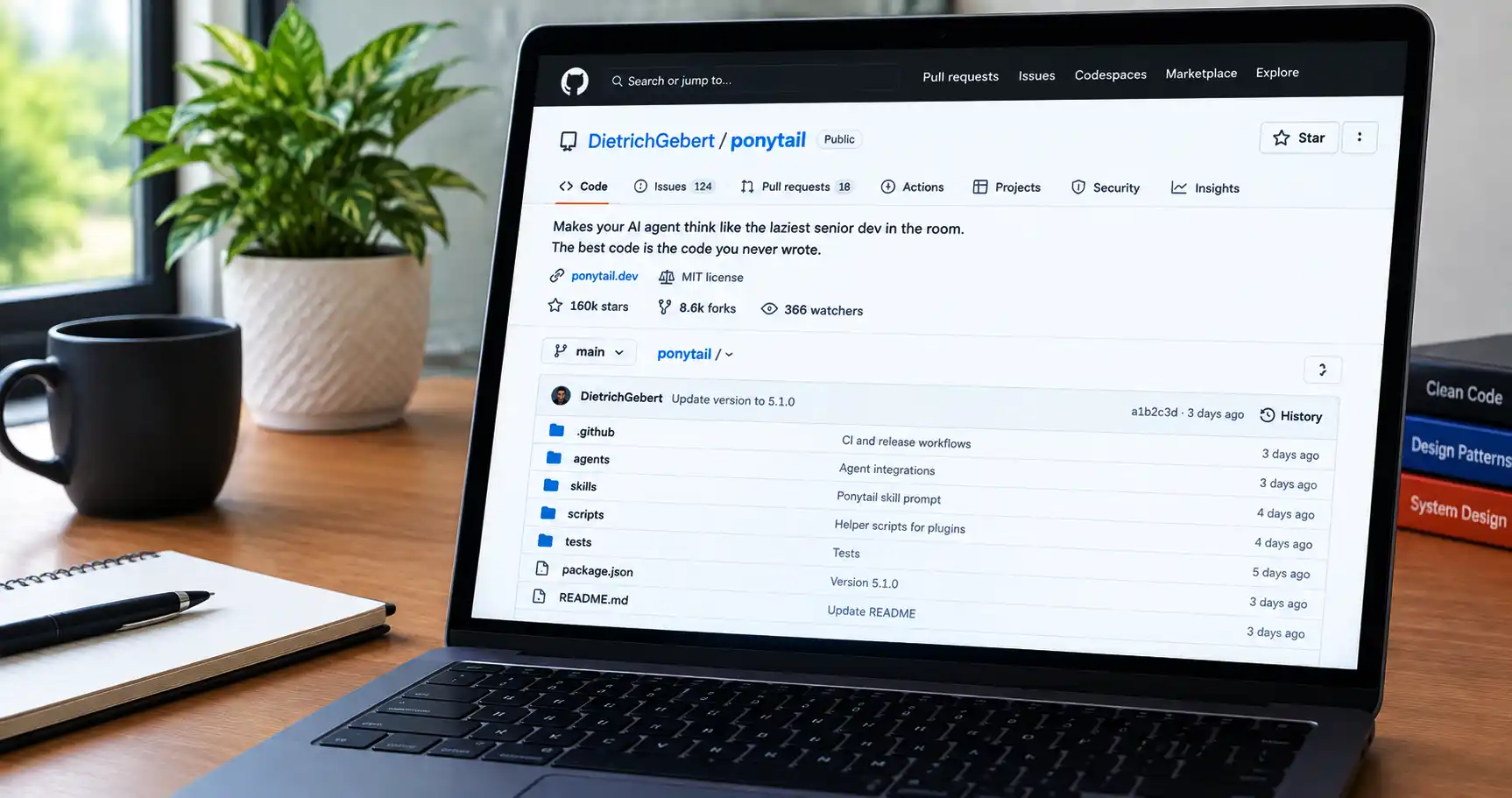
Ponytail is an open-source skill for AI coding agents, published on GitHub at DietrichGebert/ponytail. It tells your agent to act like a “lazy senior developer”: solve the whole task with the smallest change that fully works, and leave out features, abstractions and dependencies nobody asked for. It is MIT-licensed and installs as a plugin for tools like Claude Code and Codex.
If you searched for “github ponytail” or “ponytail skill github”, you most likely want to know three things: which repository is the real one, what the skill actually changes in your agent’s behavior, and whether the impressive numbers on the README hold up. I read the repository itself to answer those, and I will be clear about what the project claims versus what I could check.
I write about AI tools for people who want practical results rather than hype. If you are new to coding agents, my AI guides give background before you add skills to one.
One honest note: I did not install and run Ponytail for this article. Everything below comes from the repository’s own files on 12 October 2026. The project moves fast, so confirm commands and versions in the repository before you rely on them.
What is the Ponytail GitHub repository?
The repository is github.com/DietrichGebert/ponytail. The About line describes it as a project that “makes your AI agent think like the laziest senior dev in the room,” with the tagline “The best code is the code you never wrote.” The project website is ponytail.dev, and the license is MIT.
The README’s mental picture is a long-time senior developer who looks at your fifty lines, says nothing, and replaces them with one. Ponytail puts that habit into your AI agent through a prompt.
How to be sure you have the official one
- The owner is DietrichGebert and the repository is ponytail. GitHub usernames are not case-sensitive, so “dietrichgebert” in lowercase reaches the same place.
- The README says to install only from DietrichGebert/ponytail on GitHub or @dietrichgebert/ponytail on npm, and notes the project never ships .exe or .dll files, so a copy that does is not the project.
- Be careful with similarly named forks, mirrors and “skill marketplace” listings. Copy install commands from the README or INSTALL.md.
What does the Ponytail skill actually do?
Ponytail is, in the README’s words, one prompt: skills/ponytail/SKILL.md. A compact version for agents that read a rules file is AGENTS.md. Everything else in the repository loads that prompt into different agents.
The prompt tells the agent to read the task and the code it touches first, list every place a change must reach, and then take the first option that fully works:
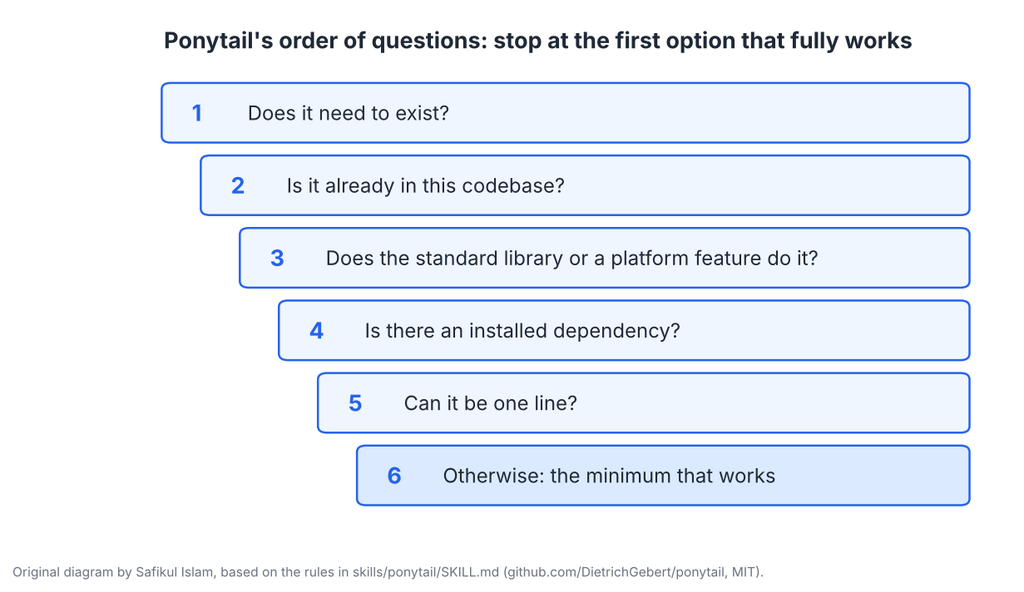
Three details make it more than a “write less code” instruction:
- It is lazy about the solution, not about the change. The prompt says to finish every part the task needs, including callers, tests, and fixtures your change breaks.
- There is a never-cut list: validation at trust boundaries, error handling that prevents data loss, security, accessibility, and anything the user asked for.
- Non-trivial logic leaves one small test behind, and deliberate shortcuts get a comment in the form “shortcut: the limit, when to upgrade.”
The skill also has three levels: lite (build what was asked and name the smaller option), full (the default) and ultra (also question whether the request is justified).
A concrete example from the README
The README shows a task to add a date picker to a frontend. According to the project, one run without the skill produced 335 lines, including a calendar built by hand, while Ponytail 5 reused the repository’s existing Input component with a native date type in about 10 lines. It is a single illustrative case from the project, not proof for your codebase, but it shows the idea: check what already exists before writing anything.
Commands in the Ponytail repository
The README lists six commands. Which ones work depends on your agent.
| Command | What the README says it does |
|---|---|
| /ponytail [lite | full | ultra | off] | Sets the intensity or turns the skill off. With no argument, it switches on at the default level or reports the current level |
| /ponytail-review | Reviews the current diff for bugs, security, real load, risky code without a test, slow paths and what to cut. Each finding says what the code does, what goes wrong, how to fix it and what happens if you do not |
| /ponytail-audit | The same kind of check for the whole repository, with the most important problems first |
| /ponytail-debt | Collects the “shortcut:” comments you have deferred into a ledger so “later” does not become “never” |
| /ponytail-gain | Shows the measured impact scoreboard from the benchmark |
| /ponytail-help | Quick reference for the commands |
The README says commands need a skill-capable host such as Claude Code, Codex, Devin CLI, OpenCode, Gemini, pi, Hermes Agent, Qoder or Grok Build. Instruction-only adapters, such as Cursor’s rule file, Windsurf, Cline, Copilot, Kiro, and Antigravity, load the always-on rules without the commands. In Codex, commands are invoked with a namespace, for example $ponytail:ponytail-review.
How to install Ponytail from GitHub
The README and INSTALL.md give agent-specific steps. These are the main routes as of 12 October 2026, so check them again before you run them.
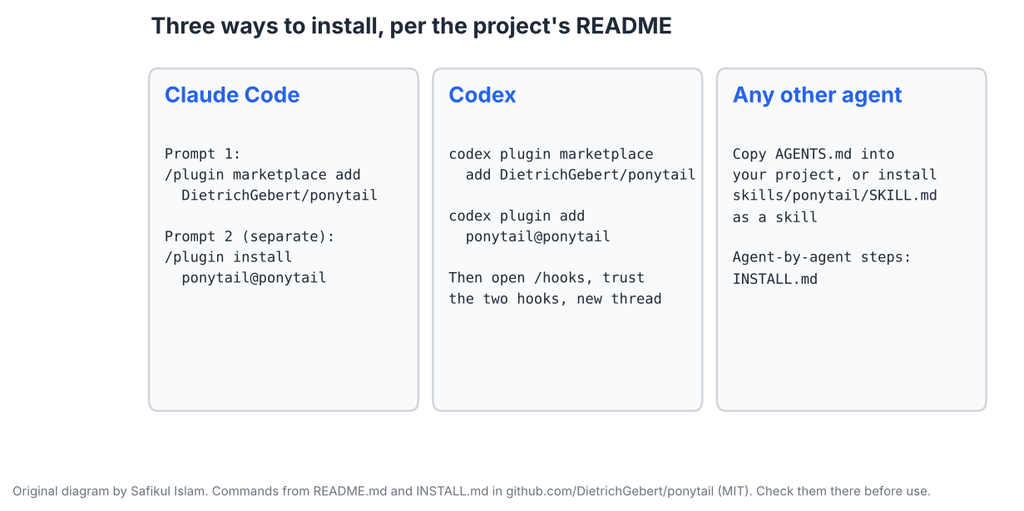
Claude Code
Send these as two separate prompts, as the README instructs:
/plugin marketplace add DietrichGebert/ponytail
/plugin install ponytail@ponytail
Codex
codex plugin marketplace add DietrichGebert/ponytail
codex plugin add ponytail@ponytail
Then open /hooks in Codex, trust its two lifecycle hooks and start a new thread.
Other agents
Copy AGENTS.md into your project, or ask your agent to install skills/ponytail/SKILL.md as a skill. INSTALL.md also lists steps for GitHub Copilot CLI, Pi, Kimi Code, OpenCode and others.
Node.js note: the Claude Code and Codex plugins run two small Node.js lifecycle hooks, so INSTALL.md says node needs to be on your PATH. Without it, the skills still work but each hook call shows a harmless “node: command not found” error.
Checkpoint: After installing, start a new session and check that the startup text shows the current Ponytail mode, as the README describes.
Do the Ponytail benchmarks hold up?
The README leads with strong numbers for Ponytail 5. Here is what the project reports and what to keep in mind.
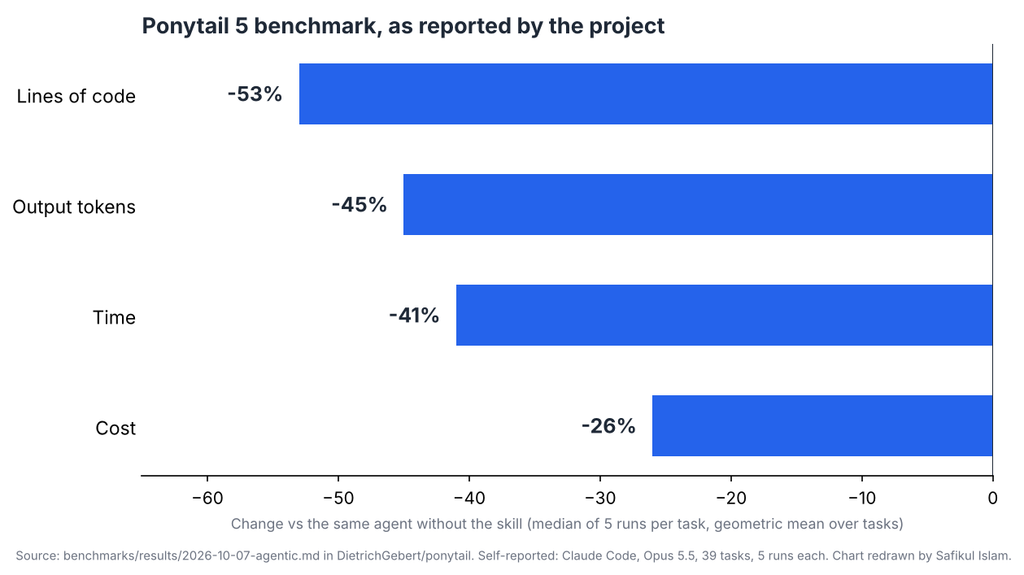
The write-up says the test used headless Claude Code sessions with Opus 5.5 across 39 tasks, five runs each, comparing the same agent with and without the skill. It also reports:
- Tests: a test where the logic needs one appeared in 98% of cases with Ponytail 5 versus 68% without a skill.
- Correctness on the 18 tasks with hidden checks: 87 of 90 for Ponytail 5 versus 86 of 90 without a skill. In the author’s words, the arms are level, so less code did not add correctness or safety.
- Security tasks: all arms passed all 30 runs on the six security tasks.
- A hard case: a privacy task passed in only 2 of 5 runs in every arm.
How I read these numbers
- They are the author’s own benchmark. I did not rerun it, and I am not aware of an independent replication.
- It measures one agent and model combination, Claude Code with Opus 5.5. Results with other agents or models may differ.
- Bash was disabled for every arm by design, so it measures what the agent writes, not what it can debug.
- Fewer lines is not automatically better. The project itself says the rule is not “fewest tokens” but to write only what the task needs and never cut validation, security or accessibility.
My practical take: treat the numbers as a reason to try the skill on a small project and compare results, not as a promise for your codebase. Ask your agent to leave the diff for you to review, because the shortest change still needs a human check.
Is Ponytail safe to install?
Ponytail is mostly a prompt plus some helper scripts, which is a lighter risk than an agent that runs commands on its own. But it still changes how your agent behaves and runs scripts on your machine, so a few habits are worth keeping:
- Read SKILL.md. It is short and written in plain English, so you can see exactly what instructions your agent gets.
- Know what runs. The README and INSTALL.md say the plugins run two lifecycle hooks in Node.js. In a quick text search I did not find web addresses or HTTP calls in the hook scripts, and one script runs a local command through Node’s child_process. That is not a security audit, so review the files yourself if it matters for your work.
- Install only from the official sources named in the README, and ignore copies that ship executables.
- Try it first on a throwaway project or branch, and review the diff before you merge.
Note that the skill applies to subagents too in some setups, per the project, so check your agent’s behavior if you rely on multi-agent workflows.
Who is Ponytail for?
- Developers who find their AI agent over-engineers: extra helpers, wrappers, options and dependencies for simple tasks.
- Teams that want a repeatable reviewing habit through /ponytail-review before merging agent-written code.
- Anyone who wants the agent to state what it skipped or did not check at the end of each reply, which the skill requires.
It may be less useful when you actually need a larger framework or abstraction, or when you work in a highly regulated area where you need more, not less, defensive code. The prompt does let you push back: the README says that if you insist on the larger design, it will build it.
Popularity and versions: what the numbers say
When I checked the repository page on 12 October 2026, GitHub showed about 160,000 stars, about 8,600 forks and 366 watchers. Third-party catalogs list slightly different, older figures, and some do not explain how they count. The version field in the repository’s package.json reads 5.1.0, and the latest commit I cloned was dated 10 October 2026. The releases page view I fetched listed older tags, so check it directly for the current release.
Stars show interest, not quality. A high count is a reason to take a look, not a reason to skip reading the code.
What other pages say, and how this guide differs
Third-party pages such as Skillselion’s guide and ClaudeSkills.info summarize Ponytail, but they quote older benchmark numbers, show catalog stats without explaining them and include affiliate or promotional elements. This article works from the repository files, so where those pages disagree with the repository, I follow the repository. For example, some pages describe the deferred-shortcut comment differently from the current README, which uses “shortcut:”.
Ponytail GitHub checklist
- Confirm the owner is DietrichGebert and the repository is ponytail.
- Read SKILL.md and INSTALL.md for your agent.
- Check that Node.js is on your PATH if you use the Claude Code or Codex plugin.
- Try it first on a small project or branch.
- Run /ponytail-review before merging agent-written changes.
- Compare diffs with and without the skill on your own tasks.
- Re-check releases and the README before upgrading.
If you want help adding AI-assisted development to a real project, Leelija Web Solutions, the company I lead, provides web and software development services.
Frequently asked questions
It is the DietrichGebert/ponytail repository: an MIT-licensed skill and set of plugins that make AI coding agents write the smallest complete change instead of over-engineered code.
In Claude Code, send “/plugin marketplace add DietrichGebert/ponytail” and then, as a separate prompt, “/plugin install ponytail@ponytail”. Codex and other agents have their own steps in the README and INSTALL.md.
Yes. The LICENSE file is the MIT License, copyright 2026 DietrichGebert.
The README says it works with many agents, including Claude Code, Codex, Cursor, Copilot, OpenCode, Gemini and others, with full commands on skill-capable hosts and rules-only support on the rest.
It reviews your current diff like a senior developer who gets paged when it breaks, covering bugs, security, load, missing tests, slow paths and what to cut. You can narrow it to uncommitted changes, staged changes, a branch or a pull request link.
The project’s benchmark says correctness and security results stayed level with the no-skill baseline, but that is the author’s own test on one agent and model. Review diffs and run your tests either way.
Yes. GitHub usernames and repository paths are not case-sensitive, so both open the same repository.
No. The README says an optional config file or the PONYTAIL_DEFAULT_MODE environment variable can set the default level, but nothing is required.