

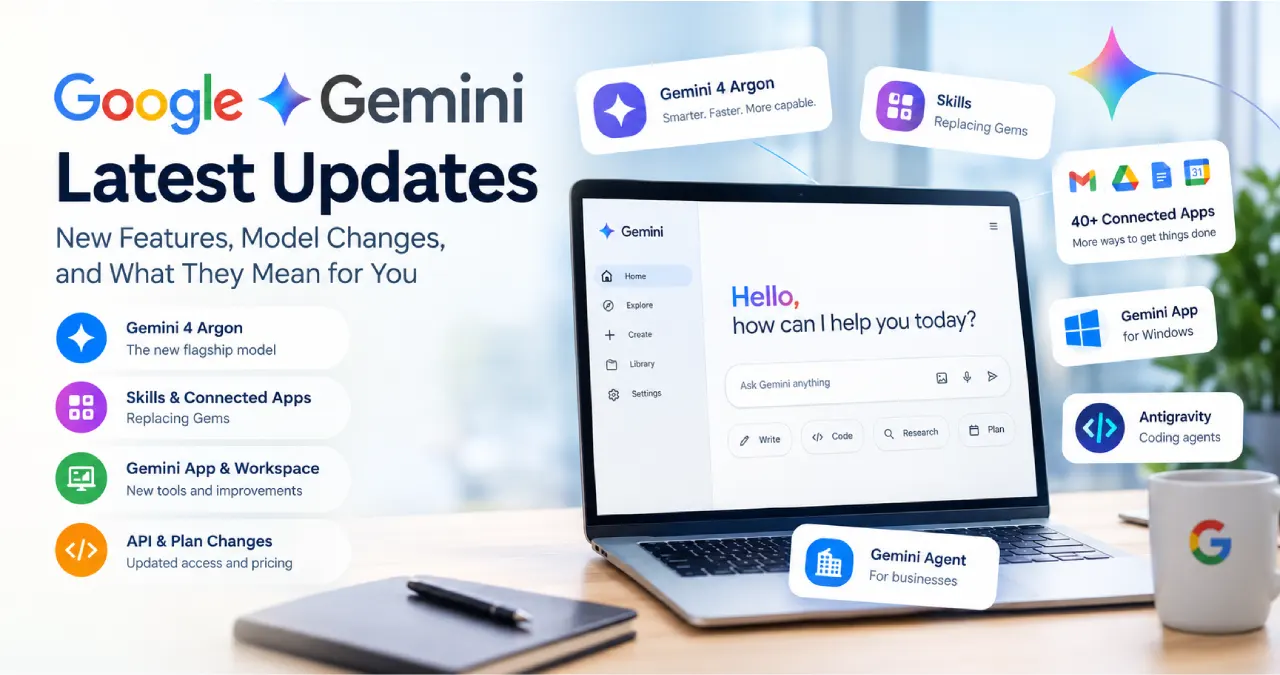
The biggest Google Gemini news right now is Gemini 4 Argon, Google’s new flagship model, which reached the Gemini app for Google AI Pro and Ultra subscribers on 13 October 2026. Around it, Google also added skills (which will replace Gems), a Customize page with more than 40 connected apps, a Gemini app for Windows, Antigravity coding agents in the macOS app, a universal Gemini agent for businesses, and a change to which models free users get.
If you searched for the Gemini latest update, the honest answer is that there is no single one. Models, app features, plan limits and Workspace tools arrive on different dates and for different people. That is why I have organised this guide by date, access and what you might actually do about each change.
I write for people who want practical results rather than hype, so I focus on who gets each feature and what to check first. If you are new to the topic, my AI guides give useful background.
One note on method: this is a news roundup, not a hands-on review. Everything here comes from Google’s own pages and clearly labelled press coverage, checked on 16 October 2026. Gemini changes quickly, so confirm access in your own account before you plan around any feature.
Google Gemini news at a glance
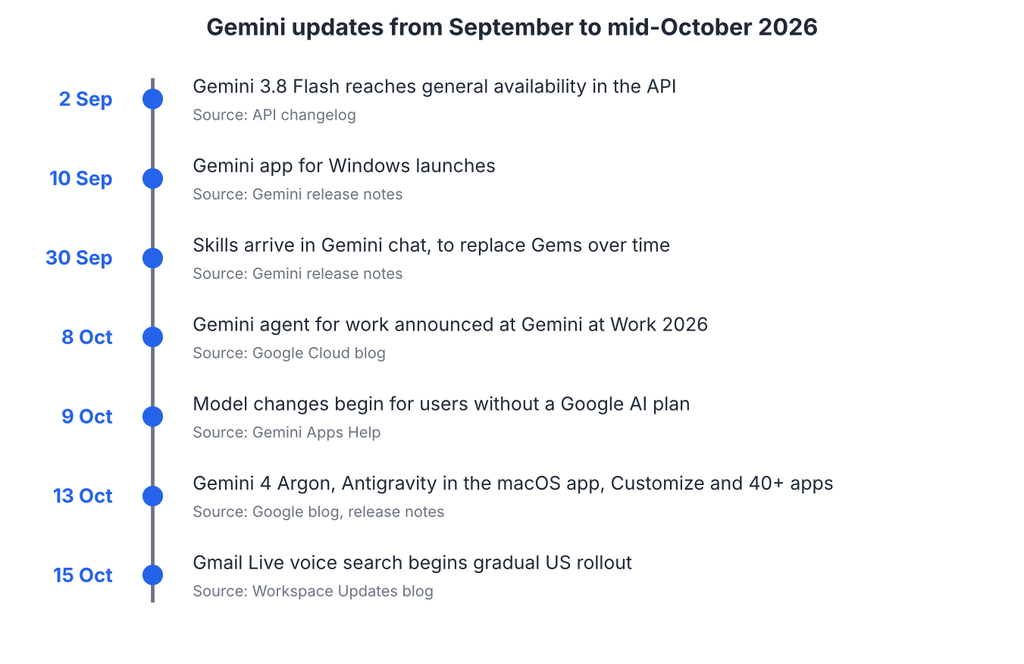
| Date | Update | Who it affects |
|---|---|---|
| 13 October | Gemini 4 Argon in the Gemini app; Antigravity in the macOS app; Customize and 40+ connected apps | Google AI Pro and Ultra for Argon; connected apps for all tiers |
| 13 October | Gemini 4 Argon reaches general availability in the Gemini API | Developers on the paid API tier |
| 9 October | Model changes begin for users without a Google AI plan | Free Gemini users; AI Plus users get their own date by email |
| 8 October | Gemini agent announced at Gemini at Work 2026 | Businesses first, through Google Cloud |
| 30 September | Skills in Gemini chat, starting to replace Gems | Gemini app users, rolling out gradually |
| 10 September | Gemini app for Windows | Windows 10 or later users |
Dates come from the Gemini release notes and the other Google pages linked in each section. A date is an announcement or rollout start, not a promise that your account has the feature that day.
Gemini 4 Argon is the headline model
Google’s release post says Gemini 4 Argon is now available in the Gemini app for Google AI Pro and Ultra subscribers. Google describes it as bringing “frontier reasoning and improved performance across complex tasks,” more direct answers with less hedging, and major improvements in coding. Those are Google’s own characterisations; I have not seen independent benchmark results for them.
The post also mentions a chat-to-tasks toggle so Gemini can keep working on tasks while you are away from your computer. It does not state regional availability or usage limits, so the plan name is the part you can rely on for now.
What developers should know
The Gemini API changelog says Gemini 4 Argon (gemini-4-argon) reached general availability on 13 October 2026 and describes it as the most capable model for complex coding, agentic, math and science tasks. The pricing page lists standard paid rates of $2 per million input tokens and $10 per million output tokens through 30 November 2026, rising to $4 and $20 from 1 December 2026. It also says Argon is not available on the free API tier.
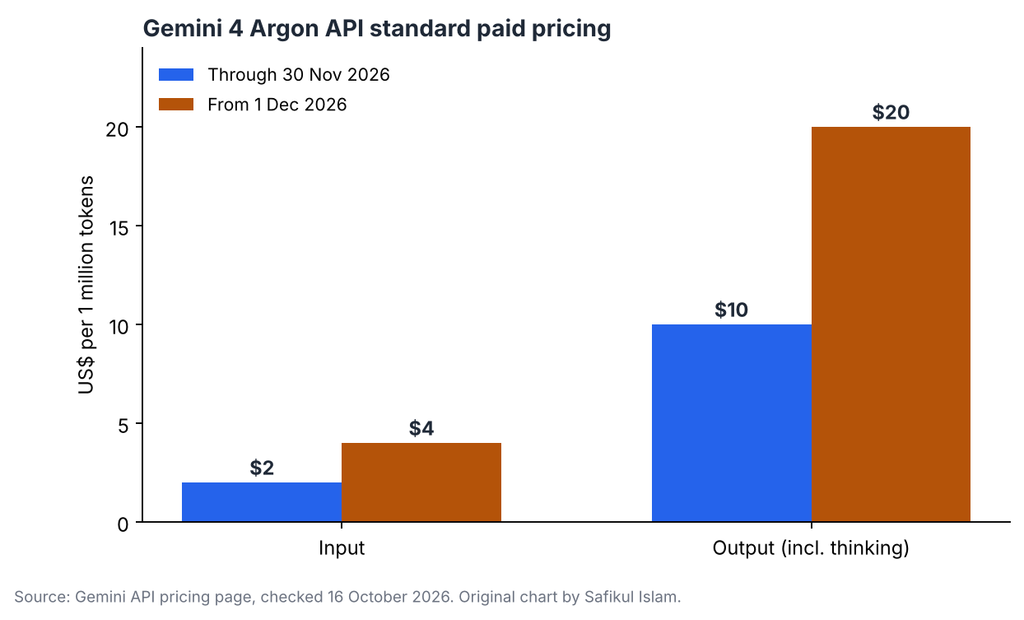
That price step matters if you are planning a project. Budget with the December rates, not the introductory ones, and compare cost per acceptable result rather than cost per token. A model that needs fewer retries can be cheaper in practice even at a higher rate.
Some press coverage adds details such as early testers and a limited cybersecurity access programme. I treat those as secondary reporting until Google’s own pages confirm them. Reading from the primary pages first also helps your content hold up in AI search, a topic I cover in my guide to optimising for AI search.
New Gemini app features worth knowing
Beyond the model, the Gemini app itself changed in several ways this autumn. These are the ones I would look at first.
Skills are replacing Gems
Skills are reusable instruction sets that Gemini can build from your chats and run automatically. The release notes say they started rolling out on 30 September, and that existing Gems will migrate to skills. Google’s Gems-to-skills transition page gives the practical timeline.
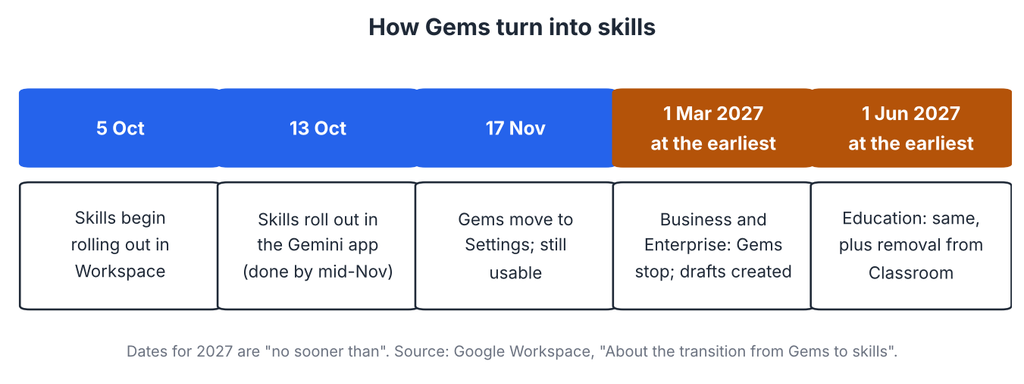
- Gems and skills both work for now. Gems move into Settings in the Gemini app on 17 November 2026.
- For business and enterprise accounts, Gems stop working no sooner than 1 March 2027, and remaining Gems become inactive draft skills that the creator must review and activate. Education follows no sooner than 1 June 2027.
- Converted skills keep names, descriptions, instructions and knowledge files, and Drive permissions carry over.
- Skills do not currently sync between the Gemini app and Workspace apps, so a Gem used in Workspace Studio has to be recreated there.
My practical advice: list the Gems your team depends on, note who owns each one, and rebuild the important ones as skills before the automatic migration. Treat a rebuilt skill like any other change and test it with a few familiar prompts.
One detail to watch: Google’s pages describe age limits differently. The release notes mention users 18 and older, while the Workspace pages say Gemini app skills are open to all ages and Workspace skills to users over 18. Check the rule for your own account type.
Customize and connected apps
On 13 October, Google added a central place to tailor Gemini, add skills and connect more than 40 apps, with Instacart, OpenTable and Adobe named as examples. It is rolling out on web, mobile and the Windows and macOS desktop apps for all user tiers. Most connected apps are English-only and US-focused, with some in other English-speaking regions, Brazil and India.
Gemini on your desktop
The Windows app, released on 10 September, opens with Alt + Space and connects to Google apps such as Gmail and Drive. The release notes list Windows 10 or later and no country restrictions. On 13 October, Google also brought Antigravity to the Gemini macOS app, so you can start coding agents from chat that build and test code in the background. That one is English-only, for personal accounts and eligible work accounts for users 18 and older, in regions where Antigravity is supported.
Free and paid plan changes
Plan changes are the part of Gemini news that most often surprises people, so I want to be precise.
According to Google’s models help page, changes start in October 2026 and take effect on 9 October for people without an AI subscription. For those users, Auto is the default and mostly routes prompts to Flash-Lite, with Flash or Pro for harder ones. With smart model selection turned off, all responses use Flash-Lite. AI Plus subscribers get an email with their own date.
Some headlines compressed this into “free Gemini is Flash-Lite only.” That is close but not exact, because Google describes Auto routing for harder prompts. I would describe it as a smaller default model rather than a total loss of access.
The usage limits page explains the allowance system: a limit that refreshes every five hours until you reach a weekly limit, with different prompt types costing more of it. It also lists what each plan multiplies.
| Plan | Usage compared with standard limits | Context window | Notes |
|---|---|---|---|
| Free | Standard limits | 32k tokens | Some features, such as video generation and scheduled actions, are not included |
| Google AI Plus | 2x standard | 128k tokens | Model access changes arrive on an account-specific date |
| Google AI Pro | 4x standard | 1M tokens | Argon is available in the Gemini app |
| Google AI Ultra | 5x or 20x AI Pro, by subscription | 1M tokens | Argon is available in the Gemini app; availability limited to supported countries |
Google says limits may change without notice, so check Settings > Usage Limits for your own numbers. Prices are on the Google AI plans page, which shows them at sign-up; I have not repeated third-party price quotes because plan prices change and vary by country.
If you are deciding whether to pay, start with the problem, not the plan. If you hit limits during real work, an upgrade can make sense. If you mostly ask short questions, a free account may still be enough.
Gemini for work: the agent and Workspace updates
The Gemini agent for businesses
At Gemini at Work 2026 on 8 October, Google Cloud introduced a universal agent for work: one prompt box that draws on business context, plans the work, uses skills and tools, and returns finished output. Google says it picks the best model for each job and includes cost controls and governance.
The Google post does not say who can use it or when. TechCrunch reported that it starts with businesses through Gemini Enterprise, with consumers later, and listed integrations including Workspace, Microsoft 365, Slack, Jira and MCP servers. That report also says users can choose other models, including Anthropic’s Claude. Treat those details as press reporting until Google publishes eligibility.
If you are weighing agents for your own business, start small and define clear boundaries. My guide on how to build an AI agent covers that approach, and my list of AI automation ideas for small businesses can help you pick a first task.
Smaller Workspace updates
The Workspace Updates blog lists several Gemini-related changes this month:
- Skills in Workspace: Gemini app skills started on 13 October, but the Workspace rollout is delayed with no new date.
- Google Meet: Gemini can draft a follow-up email or export action items to Google Tasks after a meeting, with “Take notes for me” turned on. It is for eligible Business and Enterprise plans.
- Workspace Studio: new nested conditions, Gmail skip-replies, Meet calendar outputs and a Drive document search step, rolling out from 13 October.
- Gmail Live: voice search of your inbox on Android and iOS, starting 15 October, gradual over up to 15 days, limited to US users with English (US).
- Gemini student hub: study tools such as notebooks, flashcards and practice quizzes for Education users outside the EEA, plus personal accounts globally.
Gemini API changes for developers
If you build with Gemini, the API changelog has several dated changes you should not miss:
| Date | Change |
|---|---|
| 13 October | gemini-4-argon is generally available |
| 8 October | gemini-3.7-flash is deprecated and routed to gemini-3.8-flash; gemini-3.5-flash is deprecated and routed to gemini-3.6-flash |
| 23 October | deep-research-pro-preview-12-2025 shuts down; migrate to deep-research-preview-04-2026 or deep-research-max-preview-04-2026 |
| 6 October | gemini-nano-banana-2.1 reaches general availability; gemini-3.1-flash-image is deprecated with no shutdown date |
| 22 September | Gemini 3.8 Flash TTS and Flash-Lite TTS reach general availability, with voice design and replication |
| 18 September | Access to the 2.5 models is limited to users who have used them before; they are not deprecated |
The 23 October shutdown is the nearest hard deadline in this list. If any of your code calls the old Deep Research preview, test the replacement before that date rather than after.
What I would do this week
| If you are… | A sensible first step | What to check |
|---|---|---|
| A free Gemini user | Test your usual prompts and note where answers feel weaker | Whether Auto handles your harder questions |
| A Google AI Pro or Ultra subscriber | Try Gemini 4 Argon on one real task from your week | Quality, speed and how quickly you reach limits |
| A team that uses Gems | List Gems and owners, then rebuild the key ones as skills | Dates for your edition, Drive permissions |
| A Workspace admin | Review skills settings and the Meet and Gmail Live rollouts | Edition, region and default-on settings |
| A developer | Move off deprecated model names and the old Deep Research preview | Argon pricing change on 1 December |
Pick one task, measure the result against your current method, and decide from that. A new feature earns its place when it saves review time, not when it sounds impressive.
My perspective on the latest Gemini changes
The most useful trend is that Gemini is moving from answering questions to doing tasks: skills, connected apps, coding agents and a work agent all point that way. That makes access rules and review habits more important, not less.
My advice is simple. Choose one recurring task, try the matching feature, and measure how much checking the result still needs. Follow the news, but let your own work decide what you adopt.
Frequently asked questions
The newest major release is Gemini 4 Argon, available in the Gemini app for Google AI Pro and Ultra subscribers from 13 October 2026, with general availability in the Gemini API on the same date. Google also announced skills, connected apps and desktop updates in the same period.
Recent additions include skills (replacing Gems), a Customize page with 40+ connected apps, Gemini for Windows, Antigravity in the macOS app and Gemini 4 Argon. Workspace users also get Meet follow-ups, new Workspace Studio steps and Gmail Live in the US.
Google’s release post names Google AI Pro and Ultra subscribers for the Gemini app, and the API pricing page says Argon is not available on the free API tier. Check your account before assuming access.
Yes, over time. Gems and skills both work now. Google says Gems move to Settings on 17 November 2026, and for business and enterprise accounts they stop no sooner than 1 March 2027, when remaining Gems become draft skills. Education follows no sooner than 1 June 2027.
Google’s help page says that from 9 October, users without a plan get Auto, which mostly routes to Flash-Lite, with Flash or Pro for harder prompts. With smart model selection off, everything uses Flash-Lite. Compare it with your own prompts.
Use the Gemini release notes for app changes, the Workspace Updates blog for work tools and the Gemini API changelog for developers. Check the date and the availability line before you share any update.