

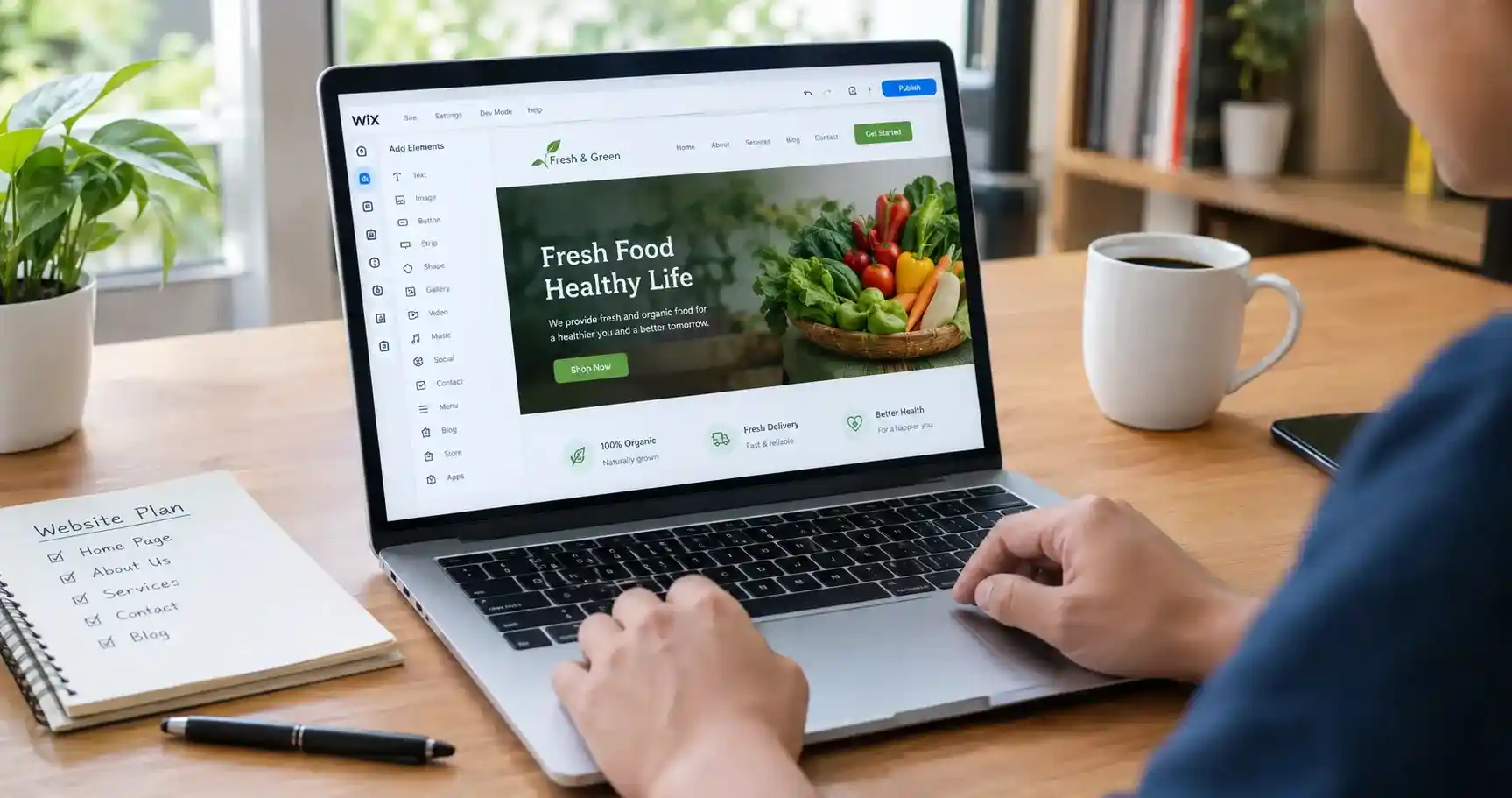
Wix is my best free website builder pick for a beginner who wants a flexible business website and an AI-assisted starting point. WordPress.com is my choice for a free blog, Carrd for a simple one-page presence, and Google Sites for a basic information website. For selling online, eligible businesses should also consider Square Free, where payment processing still costs money.
The right choice depends on what your website must do. A free portfolio, a lead-generation website, and an online shop have very different requirements.
My advice is to choose the smallest platform that meets your immediate needs, then check the cost of your next step. A builder can be free today and become expensive when you need a custom domain, working forms, payment tools, or more control.
This comparison separates free publishing from free trials and limited AI access, so you can make that decision before investing hours in a design.
Best free website builders at a glance
The seven platform recommendations combine official plan information with my assessment of business fit. I have not run the same hands-on test on every builder. My separate Elivestory example below describes my own ChatGPT-assisted WordPress theme project. Features can change, and payment availability varies by country.
| Builder | My recommended use | Main free-plan trade-off |
|---|---|---|
| Wix | General small-business website | Wix address and branding; business upgrades cost extra |
| WordPress.com | Blogging and regular publishing | Platform ads and limited storage; custom domain requires upgrading |
| Carrd | One-page profile or service introduction | Custom domains and built-in forms are paid features |
| Google Sites | Simple information or project website | Limited marketing, design, and commerce capabilities |
| Canva Websites | Visual portfolio or campaign page | Better suited to simple presentations than complex site operations |
| Framer | Design-focused prototype or personal site | Free domain, bandwidth limit, and limited AI credits |
| Square Free | Online selling in supported countries | Payment fees apply; check local plan and domain restrictions |
If you are choosing the best free website builder for small business, first decide whether success means receiving an inquiry, publishing useful content, or completing an order. That goal should drive the platform choice.
What free actually means
There are four offers that are easy to confuse:
- A free publishing plan lets you keep a live website without a recurring builder subscription, subject to its limits.
- A free trial provides temporary access before payment is required to continue using certain features.
- Free AI credits let you generate or edit a limited amount of content; they do not necessarily include permanent publishing.
- Free website software may still require paid hosting, a domain, maintenance, or extensions.
Some “free AI website builder” roundups also include builders without a permanent free plan. Hostinger, for example, describes trying its AI Website Builder through a 7-day free trial rather than a free plan. If a builder starts a trial clock or asks for payment details, treat it as a trial, not a free website.
A free custom domain for the first year of a paid plan is also different from a free website. Check the renewal price and whether the offer requires an annual commitment.
Before signing up, I would verify three things: where the free site will be published, whether the main customer action works without upgrading, and what the first required paid feature will cost.
1. Wix is my best overall free starting point
Wix lets you build and publish a website for free. Its AI builder can generate a starting site from a description, and you can continue editing the result.
Wix’s current AI builder is called Wix Harmony, launched in January 2026. It pairs an AI agent called Aria, which builds and edits from chat instructions, with a drag-and-drop editor, and Wix says Harmony is included in every plan, the free one too. Free sites keep Wix branding and a Wix address, and a custom domain starts with the paid Light plan, which 2026 plan summaries list at about US$17 a month on annual billing. Confirm current figures on Wix’s own pricing page before deciding.
I would shortlist it for a consultant, freelancer, local service business, or someone who wants more layout flexibility than a basic information page provides. It offers a practical way to explore your site structure before paying for a business setup.
The limitation is branding. Wix says connecting a custom domain, removing ads, and unlocking features such as online selling require a paid plan. Do not assume that every business tool shown in a template is usable for free.
My recommendation: use the free tier to validate your offer and create the first version. Budget for a branded domain and the appropriate plan when the website becomes central to customer acquisition.
For AI-led creation, see the official Wix AI website builder. Its generated copy still needs your review, particularly claims, prices, service areas, and contact details.
2. WordPress.com is my choice for a free blog
WordPress.com’s Free plan includes hosting, a block editor, basic SEO features, site statistics, and 1 GB of storage. It supports unlimited pages and posts, making it a sensible place to begin publishing regularly.
I would choose it for someone whose main asset will be articles rather than a visually elaborate landing page. A clear publishing workflow matters more when you plan to write every week.
Free sites display WordPress.com ads, and the Free plan cannot install plugins. A custom domain and additional capabilities require a paid plan. Its cheapest paid plan, Personal, was listed at about US$4 a month on annual billing in the 2026 plan summaries I checked; it removes ads, adds a custom domain and allows plugins. Check the live pricing page before relying on that figure. Also, WordPress.com’s hosted Free plan is different from downloading the open-source WordPress software and arranging your own hosting.
There is an important AI distinction: the current WordPress.com AI website builder documentation says the builder is available on paid plans. I would not label that specific AI site-building workflow free merely because WordPress.com also has a free website plan.
If your main goal is sharing knowledge or developing a personal brand, my guide to what a personal blog is can help you define the content before selecting a theme.
3. Carrd is my pick for a simple one-page website
Carrd focuses on responsive one-page websites. Its free offering allows up to three sites per account using its core features.
That is useful when you need a short introduction, a service summary, a portfolio preview, or a page that directs visitors to your existing channels. A focused page can be easier to maintain than a large site with unfinished sections.
The main limitation for businesses is lead collection. Built-in forms, custom domains, analytics integrations, and removal of Carrd branding are among its paid features. At the research date, Carrd Pro Standard was listed at US$19 per year; a domain is a separate purchase.
My recommendation: choose Carrd when one page genuinely fits the job. If you need a searchable article library, several service pages, and a complex customer journey, start with a platform designed for that structure.
4. Google Sites works for straightforward information sharing
Google Sites is useful for a simple site that organizes information, documents, and project resources. You can publish a site and control who can view it.
I would consider it for a small community project, event information, a team resource, or a basic business introduction. Its appeal is straightforward editing rather than detailed visual control.
Google also documents custom domain connections. You must own the domain, and account type, administrator permissions, and publishing settings can affect the setup. Domain registration is not included just because the builder is available without a separate site-building subscription.
My recommendation: choose Google Sites when the content simply needs to be accessible and organized. I would choose another platform for a growing content-marketing program, a highly customized brand experience, or a native online shop.
Before launch, check the publishing and sharing settings. A site intended for customers should not accidentally remain restricted to selected viewers.
5. Canva Websites suits visual presentations
Canva’s website builder makes sense for someone who already creates designs in Canva and wants to turn a visual concept into a simple website.
I would use it for a portfolio, event page, campaign introduction, or compact service presentation. The decision is strongest when visual communication matters more than a large collection of posts or complex business workflows.
According to Canva’s free publishing guidance, Canva Free users can have up to five live websites on the free domain. Free sites include a Designed with Canva footer. The help page also explains mobile resizing, navigation, and search-engine visibility settings.
My recommendation: build with free assets first and inspect the publish screen before relying on a premium feature. A template may include paid elements even when the platform itself has a free tier.
I would not choose Canva solely because a design looks attractive in the editor. Test navigation, contact links, text readability, and the mobile layout before treating it as a business website.
6. Framer suits design exploration with limited free AI access
Framer’s pricing page currently lists a free Framer domain, 1 GB of bandwidth, and 500 AI credits to try for a workspace without an active subscription. These are trial credits, not a promise of unlimited monthly AI generation.
Framer describes its free plan as ideal for non-commercial use and requires a paid plan for a custom domain. I would therefore treat it primarily as a design prototype or personal-project option in this comparison, rather than presenting it as the default permanent home for a business.
My recommendation: explore Framer if visual design is a priority and you are comfortable learning the editor. Before committing, check the paid plan, bandwidth allowance, AI usage costs, and any collaboration charges you will need.
The free tier is useful for answering a practical question: can you maintain this design yourself after the initial excitement of generating it?
7. Square Free is worth considering for eligible online sellers
For a business that needs to accept orders, Square’s US online selling plans deserve a separate look. Square Free has no monthly subscription charge, but processing fees apply when you accept payments.
That makes it different from a builder that only lets you display products for free. Still, a zero-dollar subscription does not mean operating a store costs nothing. Review payment fees, domain connection, fulfillment options, and the features included in your country’s plan.
Geography matters. Square’s payment availability documentation lists supported seller countries, and India is not among them at the research date. An Indian business should not choose Square merely because a US comparison calls it the best free store builder.
My recommendation: shortlist Square when your business is eligible and online selling is the main requirement. Confirm the complete order flow and local fees before investing in product entry or branding.
Which is the best free AI website builder
My first pick for a beginner who wants AI-assisted creation and a free publishing path is Wix. Framer is worth considering for design exploration, with its AI credit limits understood.
I would keep WordPress.com on the blogging shortlist while treating its dedicated AI website builder as a paid-plan feature under the current documentation.
The best free AI website builder should help you reach a usable result, not just generate an impressive preview. Ask these questions before choosing:
- Can I publish without subscribing?
- What address and platform branding will visitors see?
- How many AI generations or edits are included?
- Can I edit the result manually after credits run out?
- Does the main action, such as an inquiry or checkout, work on the selected plan?
An AI-generated page can look complete while containing a broken button, invented testimonial, or inaccurate service claim. I would always replace those with verified business information before publishing.
Where Lovable and Base44 fit
You will also see Lovable and Base44 near the top of many “free AI website builder” lists. They belong to a different category: AI app builders that generate working software from chat prompts. That suits prototypes, booking tools and simple web apps better than an ordinary brochure site. Wix has owned Base44 since 2025.
Lovable’s pricing page lists a free plan with a daily grant of 5 build credits, up to 30 a month, plus 20 Cloud credits a month. Pro was listed at US$25 a month in the 2026 plan summaries I checked. Five credits a day covers a few small prompts, so I would use it to test the workflow, not to build and maintain a business site.
Base44’s free plan is listed at 25 message credits a month, capped at 5 a day, for up to five apps on a base44.app address. The Base44 badge stays on, and a custom domain needs a paid plan, starting with Starter at about US$16 a month on annual billing in recent price lists. Sources differ on how far free-plan sharing goes, so test whether you can publish what you build before investing time.
My view: for a service business that needs a normal website, Wix is still the simpler starting point. Try Lovable or Base44 when the site has to do something, such as take bookings or run a small tool, and expect to pay once it matters.
My experience building a WordPress theme with ChatGPT
Recently, I used ChatGPT to build a WordPress theme for Elivestory, my online publication. The theme-building process took around 30 minutes in my experience, with responsive layouts and SEO fundamentals as part of the goal.
What I liked was how straightforward it felt to describe the website I wanted and turn that direction into a working theme. For someone with a clear idea, AI can make the first version much faster to create.
That is my reported build time for this project, not a promise that every business can complete its entire website in 30 minutes. Content preparation, hosting, integrations, testing and later refinements are separate considerations.
This route also differs from a hosted free website builder. WordPress is open-source software, but a self-hosted site still needs hosting and a domain. Any paid AI access, premium plugins or professional support add to the cost. I would not describe the complete Elivestory setup as free just because AI helped create the theme.
What my performance and SEO screenshots show
The two screenshots I supplied for Elivestory show the following audit scores. I am including the original images so readers can see the figures rather than relying on a claim that the website is simply “SEO optimized.”
| Audit category | Desktop screenshot | Mobile screenshot |
|---|---|---|
| Performance | 97 out of 100 | 96 out of 100 |
| Accessibility | 96 out of 100 | 96 out of 100 |
| Best Practices | 100 out of 100 | 100 out of 100 |
| SEO | 100 out of 100 | 100 out of 100 |
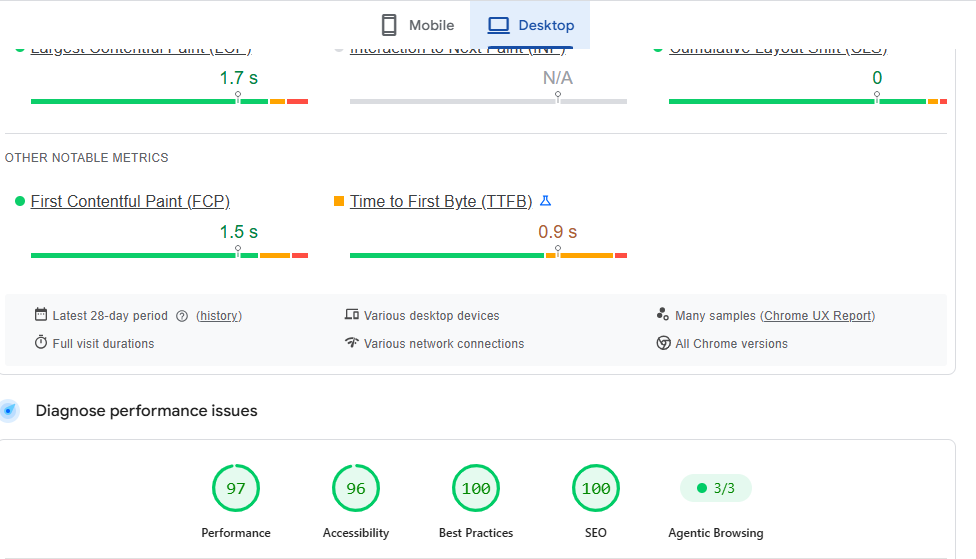
Desktop audit screenshot supplied by Safikul Islam for Elivestory. Source: author-provided image. The tested URL and test date are not visible in this crop.
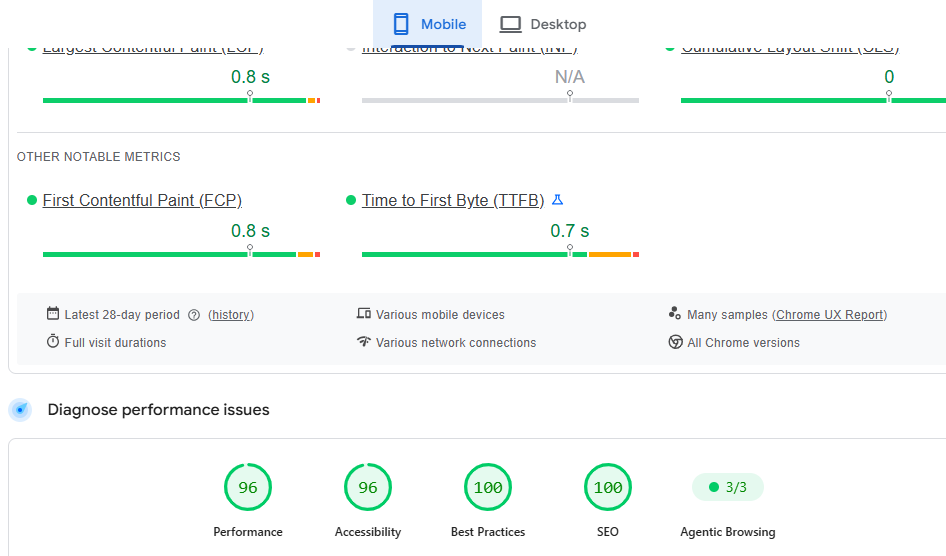
Mobile audit screenshot supplied by Safikul Islam for Elivestory. Source: author-provided image. The tested URL and test date are not visible in this crop.
These are encouraging results for the checks shown. However, a 100 SEO audit score does not establish that every page is fully optimized, indexed or competitive for its target keywords. An accessibility score of 96 also leaves room for improvement and does not replace manual testing.
The screenshots include a separate real-user section covering the latest 28-day period. That historical window should not be treated as a measurement of only the newly built theme. Google’s PageSpeed Insights documentation explains the distinction between real-user field data and simulated Lighthouse lab tests.
The visible field metrics include desktop LCP of 1.7 seconds and mobile LCP of 0.8 seconds, with CLS of 0 on both. INP is shown as N/A. Desktop TTFB is 0.9 seconds and highlighted amber; it is a sensible area to investigate, without assuming the theme alone caused it. The cropped screenshots do not establish the tested URL, date or whether the field data covers a page or the whole origin.
The SEO foundations visible on the public homepage
The public Elivestory homepage has a descriptive page title, a clear main heading about its editorial subjects, readable introduction text, and links to articles and category pages. These give visitors a useful starting structure.
Those observations are a limited homepage check. They do not verify every canonical tag, indexing directive, sitemap entry, structured-data field or mobile interaction across the website. The performance screenshots are supplied evidence, not a fresh independent test run.
For my next checks, I would test the mobile menu, search, forms, category pages and article templates, then review indexing and search performance in Search Console. I would also repeat the performance test after significant theme or plugin changes.
How I would brief AI for a WordPress theme
Start with the purpose and reader journey. Explain the pages you need, the style you prefer, and what a visitor should do next. A useful starting prompt would be:
“Help me create a lightweight WordPress theme for an editorial website. Include a homepage, article page, category archive, search results and mobile navigation. Use semantic HTML, readable typography, accessible controls and responsive layouts. Keep content manageable in WordPress. Explain how to install and test it on staging. Do not invent testimonials or create duplicate SEO metadata.”
Then test the result on a staging copy before using it on a live business website. Ask for corrections using specific examples: which screen size breaks, which button fails, or which template displays the wrong content. AI can accelerate development, but someone still needs to verify the result and maintain it.
How I would choose for a small business
Start with one measurable goal. For example, a local consultant might need five relevant inquiries a month. A creator may want people to find a portfolio and send an email. A retailer needs customers to complete orders.
Then map the goal to the required functions.
| Business need | Starting shortlist | Check before committing |
|---|---|---|
| Service introduction with room to grow | Wix | Domain, branding, forms, and business-feature costs |
| Articles and personal-brand content | WordPress.com | Ads, storage, domain, and required extensions |
| One-page professional profile | Carrd | Whether you need its paid forms or domain connection |
| Simple information hub | Google Sites | Public visibility and limits on customization |
| Visual campaign page | Canva Websites | Asset licensing, mobile layout, and publishing options |
| Design prototype | Framer | Commercial fit, AI credits, bandwidth, and upgrade cost |
| Online orders | Square where eligible | Country support, processing fees, and store features |
For a service business, I would prioritize a clear offer and a reliable contact method before animations. A beautiful page that does not explain what you do or how to contact you is not doing its job.
At Leelija, my company provides website, app, and software design and development, alongside digital marketing services. The principle I recommend to small businesses is to connect the website plan to the sales process. Decide what happens after a visitor clicks the main button.
For more guidance on layout and user experience, explore my web design guides.
The costs I would check before upgrading
The subscription price is only one part of ownership. Make a simple first-year and renewal-year estimate using the features your business actually needs.
Include:
- The builder subscription and its billing commitment.
- Domain registration and renewal.
- Business email, if it is a separate service.
- Forms, bookings, integrations, or premium assets.
- Payment processing and any platform transaction charges.
- The time or professional help required to maintain the site.
As an illustrative calculation, a US$15 monthly plan paid annually costs US$180 for that year before other expenses. It is not a US$15 total purchase. This example is arithmetic, not a quoted price for a builder in this list.
I would also ask what happens when you leave. Can you export content, contacts, and product records? Can you keep your domain? Will the design need to be rebuilt elsewhere? A cheap starting point becomes less attractive if migration requires repeating months of work.
Can a free website rank on Google and appear in AI search
A free website can be discovered, but the plan label alone does not determine whether it ranks. A published page must be accessible, useful, and eligible for indexing. Its content also needs to match what people are searching for.
Google’s SEO Starter Guide emphasizes helping search engines understand content and helping users decide whether a result is relevant.
Before publishing, check that you can:
- Write clear page titles and headings.
- Provide readable text about services, products, or topics.
- Add meaningful internal links.
- Use descriptive image alternatives where appropriate.
- Make the site public and avoid accidental indexing restrictions.
- Provide a usable mobile experience.
For Google’s AI features, its AI search guidance says established SEO practices still apply; there is no special additional optimization requirement or special schema needed for inclusion. Eligibility is not a promise that a page will be cited.
My recommendation is to publish specific answers backed by real information. Explain who you help, what the service includes, how the process works, and what customers should expect. Avoid filling a site with generic AI-written pages that say little about your business.
My SEO guides cover the broader work involved in building search visibility.
A practical free website launch checklist
Build a small, complete website before adding more pages. For many service businesses, that means a homepage, a clear service explanation, an About section, and a working way to contact you.
Before sharing the link:
1. Replace template text with accurate business details.
2. Remove sample reviews, fabricated claims, and placeholder images.
3. Test every contact button, form, and checkout you intend to use.
4. Open the site on a phone and check navigation and readability.
5. Confirm the site is publicly accessible.
6. Review the free address and platform branding as a customer would see them.
7. Save copies of your content and identify the next feature that may require payment.
If you use AI, give it a concrete brief: your audience, location, services, main customer action, and the facts it may use. Ask it to leave unknown details blank. Then review the result yourself.
My recommendation
For a general business starting point, I would begin with Wix. For a blog, I would choose WordPress.com. For a single focused page, I would look at Carrd. For an information hub, Google Sites may be enough.
Canva fits visual presentations, Framer fits design exploration, and Square deserves consideration when selling eligibility and local fees make sense.
Start free if that helps you move forward. Upgrade when a specific limitation prevents the site from serving customers, rather than paying for features simply because they are available.
Frequently asked questions
Wix is my overall starting recommendation for its combination of free publishing, visual editing, and AI-assisted creation. Carrd and Google Sites are worth considering when the website is much simpler.
For a service business, I would shortlist Wix first. For a content-led business, WordPress.com may fit better. Businesses that need online selling should compare eligible commerce platforms separately.
Yes, you can publish using the free plans discussed here, subject to their restrictions. A custom domain, premium assets, business email, advanced features, or payment processing can introduce costs.
Some builders support domain connection without a separate website-plan charge, while others require an upgrade. Google Sites documents custom domain setup, but you still need to obtain and renew the domain itself.
My main recommendation is Wix for an AI-assisted starting site with a free publishing path. Check the current free tier before building. Framer also offers limited AI trial credits, while WordPress.com’s dedicated AI builder currently requires a paid plan. Lovable and Base44 have free tiers with small credit allowances, but they suit prototypes and simple apps better than a finished business website.
It can be enough to test an idea or establish a basic presence. Whether it is sufficient long term depends on branding, the customer journey, required integrations, and how much control you need.
Yes. I used ChatGPT to build the theme for Elivestory and reported a build time of around 30 minutes for that project. This is an AI-assisted development route, with separate hosting, domain, testing and maintenance needs. It is not the same offer as a hosted builder’s free publishing plan.
No. An automated SEO score covers the checks in that report. It does not establish content quality, competitive strength, full-site indexing or future rankings. Use the audit alongside manual checks and actual search-performance data.